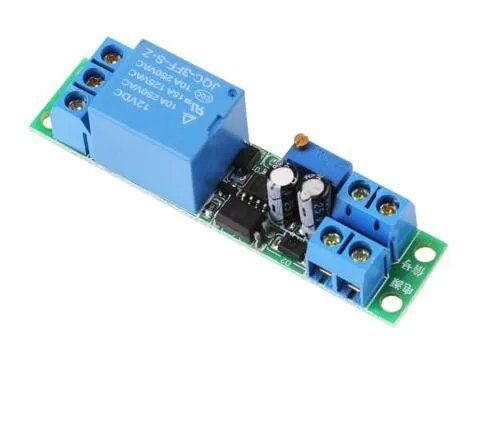
SKU: OT3260 Artikelnummer: NA445 EAN: 8720618231529 Locatie: F06.03

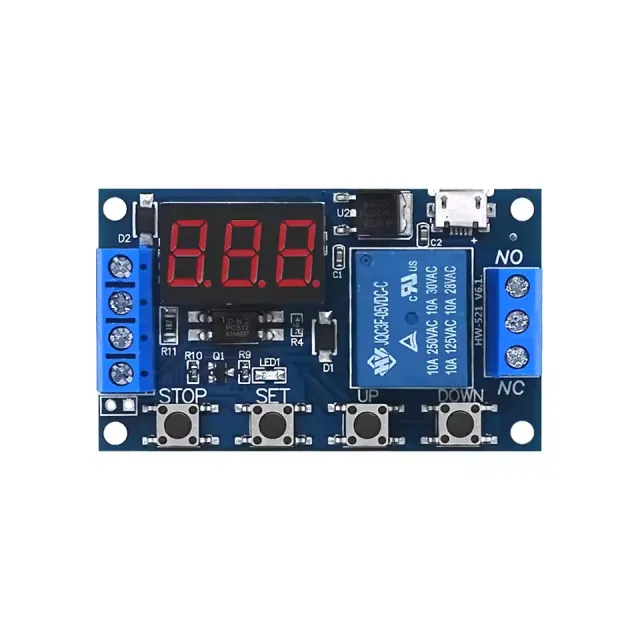
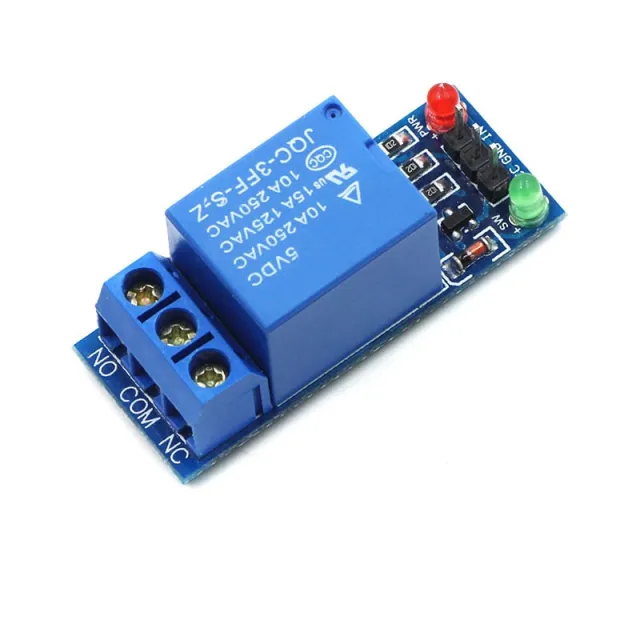
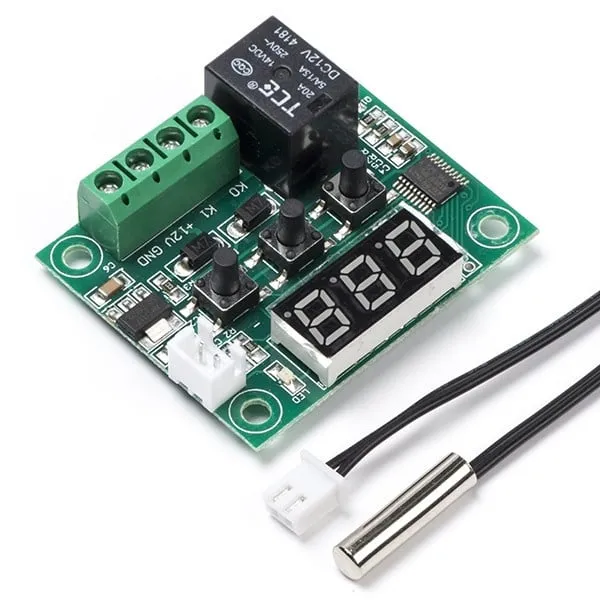
Deze tijdvertraagde relais module werkt op 12V en kan middels de schroefweerstand ingesteld worden.
Werkspanning: DC 12V
Stroomverbruik (wanneer ingeschakeld): ~46mA
Maximale spanning door relais: 30VDC of 250VAC
Maximale stroom door relais: 10A
Instelbare vertraging tussen 0.1 en 25 seconden
Voor instructies en een aansluitschema hebben wij de OTRONIC Snelstartgids voor de 12V instelbare tijdvertraging relais module voor u beschikbaar.
Instructies:
Deze OTRONIC® instelbare tijdvertraging relais module heeft een instelbare vertraging voor uitschakelen (afvallen).
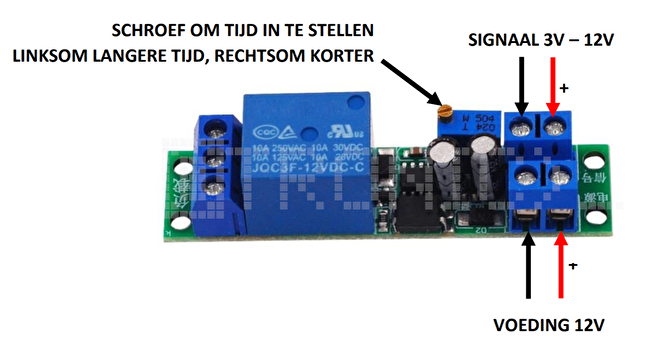
Relais testen
U kunt de ingestelde tijd van het relais testen zonder een externe aansturing.
Sluit 12V voeding aan op VCC en GND (Voeding). Zonder signaal zal het relais éénmalig de
tijdvertraging uitvoeren. U kunt dit horen aan de klik van het relais.
Gebruik de schroefweerstand om de tijd aan te passen. Linksom voor een langere tijd en rechtsom
voor een kortere tijd.
LET OP: Er zijn meerdere omwentelingen van de schroef nodig om de tijd aan te passen.
Afmetingen
Lengte: 6,68cm
Breedte: 1,6cm
Hoogte: 1,68cm
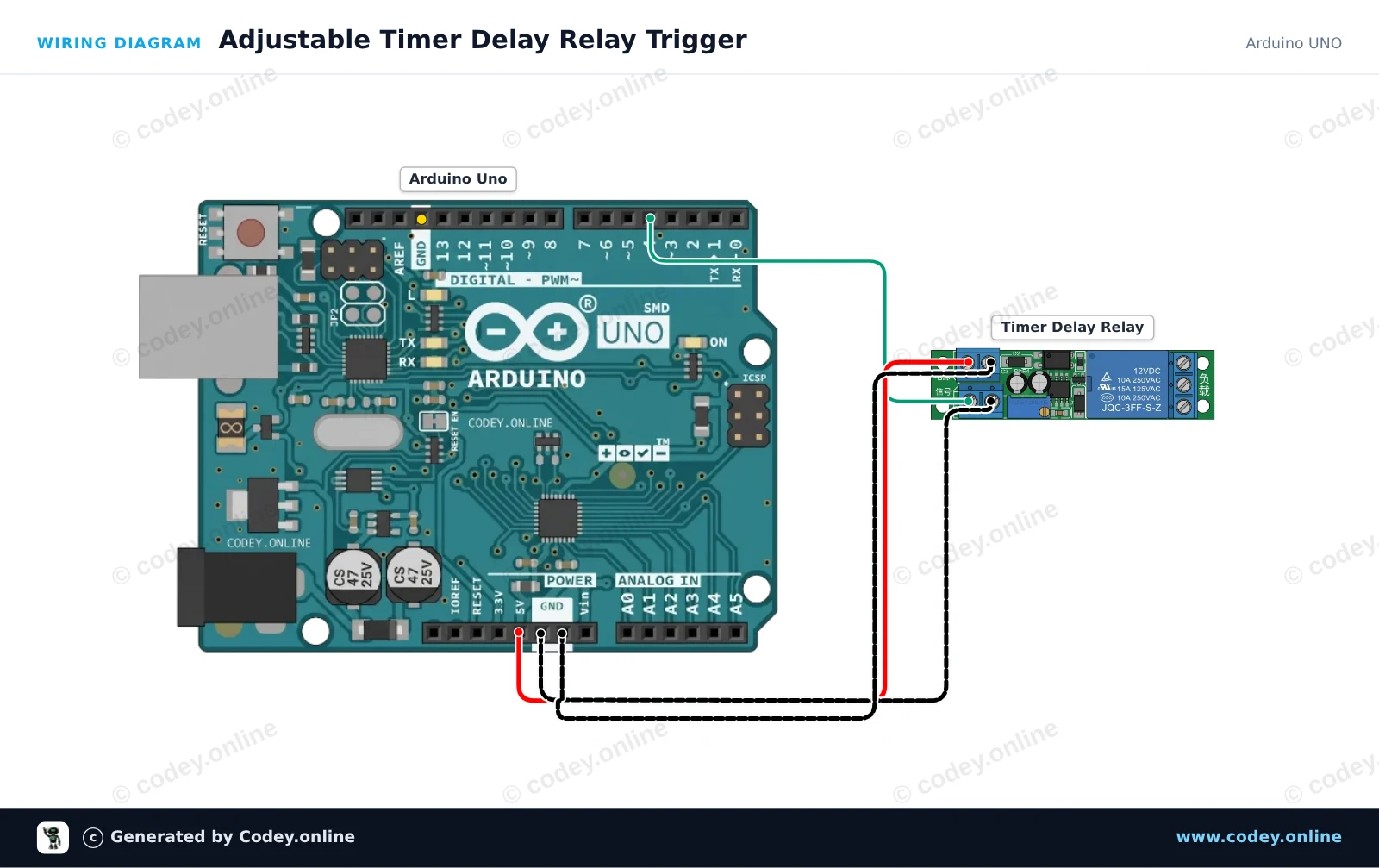
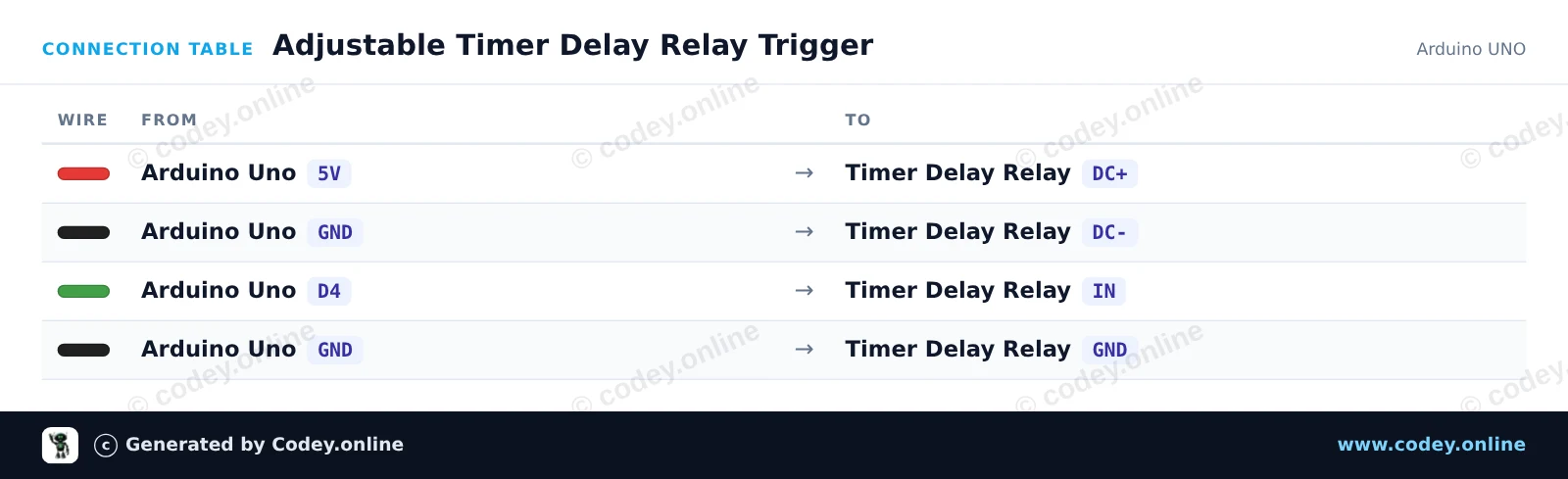
Zo sluit je de 12V instelbare tijdvertraging relais module aan op een Arduino UNO of ESP32, met een voorbeeldsketch die je direct kunt uploaden.
Dit project laat zien hoe je een verstelbare timervertraging-relaismodule kunt aansturen met een Arduino Uno. De Arduino stuurt een korte puls van digitale pin 4 naar de IN-triggerpin, waardoor de ingebouwde timervertragingcyclus wordt geactiveerd. Stel de potentiometer op de relaismodule af om de duur van de relaisactivering te wijzigen.
/*
 * ==================================================================
 *  Generated by Codey.online  —  https://www.codey.online
 * ==================================================================
 *  Project   : Adjustable Timer Delay Relay Trigger
 *  Board     : Arduino UNO (arduino:avr:uno)
 *  Parts     : DC 12V adjustable timer delay, time delay relay turn off switch module time relay time switch 0~25sec for smart home, automatic control
 *  Libraries : none (built-in)
 *
 *  Codey Online is an AI-powered browser IDE for Arduino and ESP32.
 *  Describe your project and Codey writes the code, draws the wiring
 *  diagram and uploads it to your board, straight from the browser.
 *  This code is free to use, modify and share, without warranty.
 * ==================================================================
 */

// Timer Delay Relay Module Demo
// Sends a trigger pulse to start the module's countdown delay.

const int triggerPin = 4;

void setup() {
  pinMode(triggerPin, OUTPUT);
  digitalWrite(triggerPin, LOW);

  Serial.begin(115200);
  Serial.println(F("Timer Delay Relay Demo Initialized."));
}

void loop() {
  Serial.println(F("Triggering relay delay cycle..."));

  // Send a 200 ms HIGH pulse to trigger the module
  digitalWrite(triggerPin, HIGH);
  delay(200);
  digitalWrite(triggerPin, LOW);

  Serial.println(F("Trigger sent. Waiting for delay cycle to complete..."));

  // Wait 10 seconds before triggering the next cycle
  delay(10000);
}Wiring diagram and example code generated by Codey.online — https://www.codey.online
Dit project laat zien hoe je een instelbare 12V time-delay-relaismodule kunt aansturen met een ESP32. De ESP32 stuurt een korte triggerpuls om de aftelling te starten, en het relais blijft bekrachtigd gedurende de tijd die is ingesteld met de onboard potentiometer (0 tot 25 seconden).
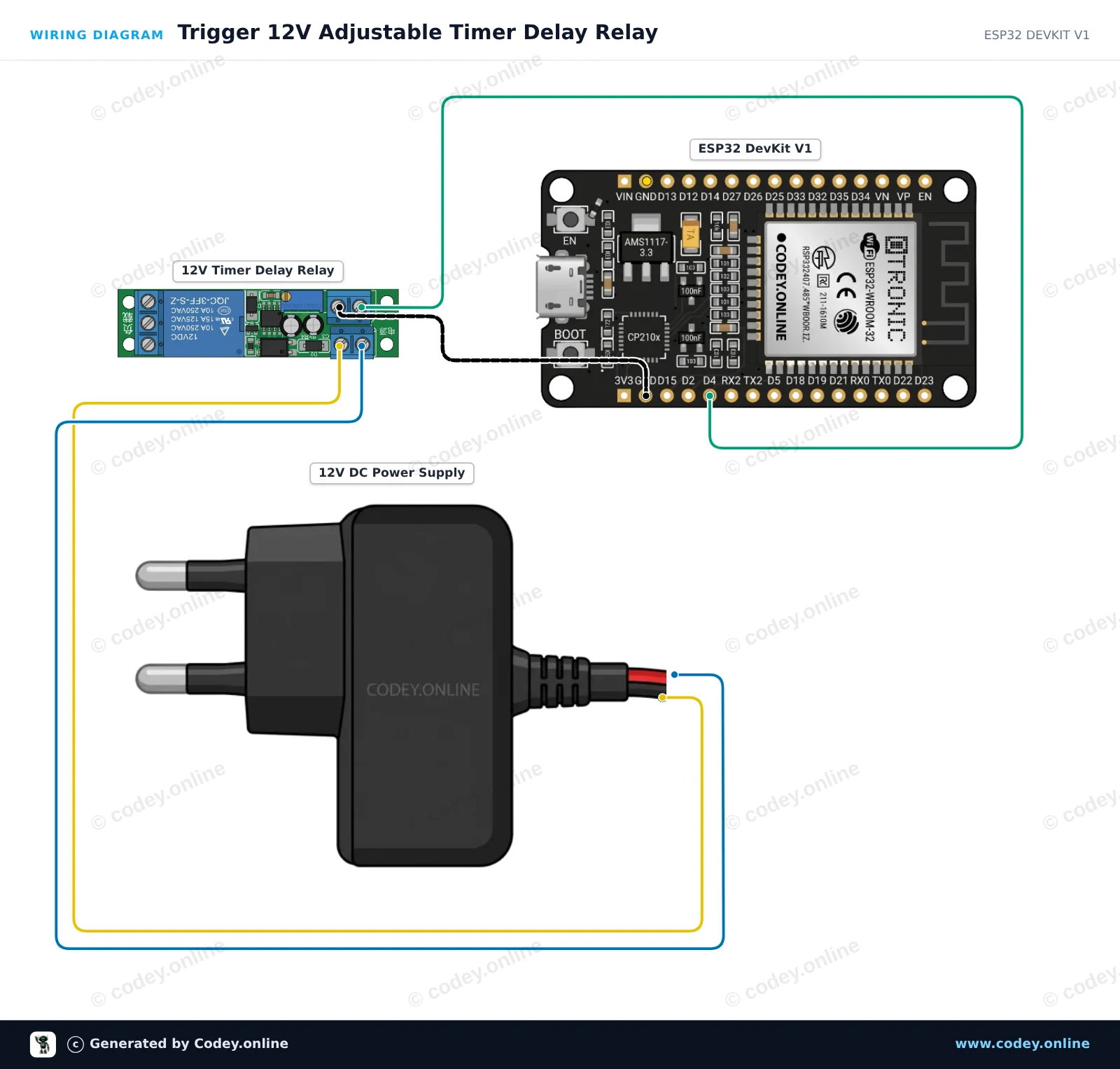
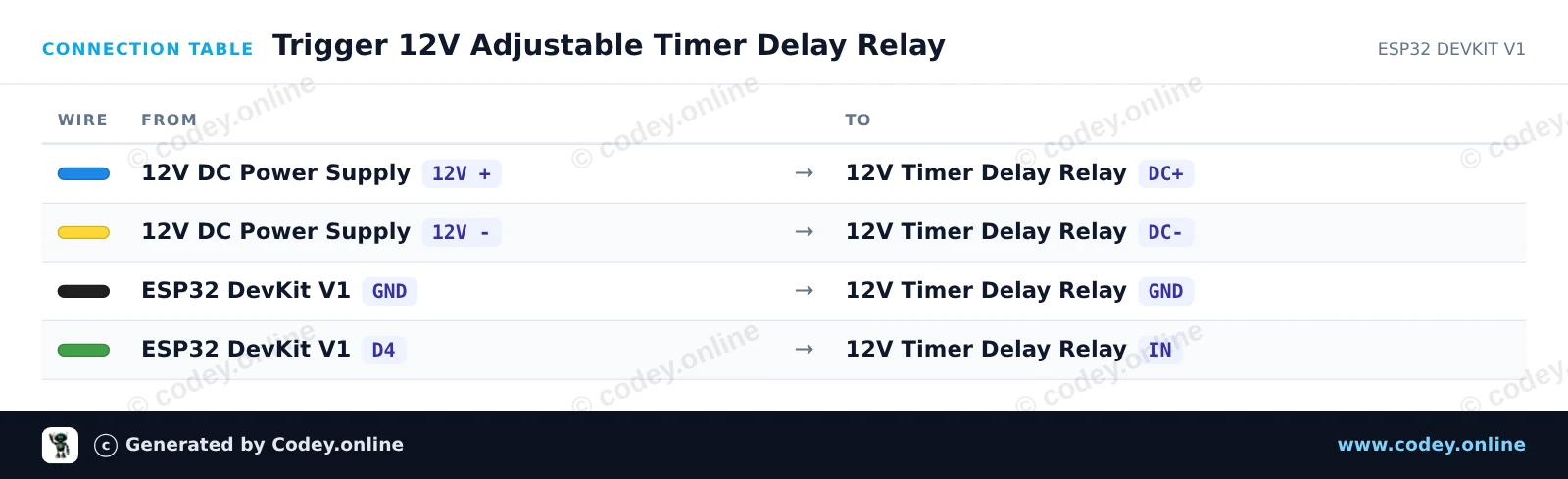
/*
 * ==================================================================
 *  Generated by Codey.online  —  https://www.codey.online
 * ==================================================================
 *  Project   : Trigger 12V Adjustable Timer Delay Relay
 *  Board     : ESP32 DEVKIT V1 (esp32:esp32:esp32doit-devkit-v1)
 *  Parts     : DC 12V adjustable timer delay, time delay relay turn off switch module time relay time switch 0~25sec for smart home, automatic control
 *  Libraries : none (built-in)
 *
 *  Codey Online is an AI-powered browser IDE for Arduino and ESP32.
 *  Describe your project and Codey writes the code, draws the wiring
 *  diagram and uploads it to your board, straight from the browser.
 *  This code is free to use, modify and share, without warranty.
 * ==================================================================
 */

// Pin connected to the IN trigger pin of the timer relay module
const int TRIGGER_PIN = 4;

void setup() {
  Serial.begin(115200);
  pinMode(TRIGGER_PIN, OUTPUT);
  digitalWrite(TRIGGER_PIN, LOW);

  Serial.println("ESP32 12V Timer Delay Relay Module Initialized");
  delay(1000);
}

void loop() {
  Serial.println("Sending trigger pulse...");

  // Send a 200 ms pulse to activate the timer
  digitalWrite(TRIGGER_PIN, HIGH);
  delay(200);
  digitalWrite(TRIGGER_PIN, LOW);

  Serial.println("Triggered! The relay will remain active for the duration set by the potentiometer.");

  // Wait 15 seconds before triggering the next cycle
  delay(15000);
}Wiring diagram and example code generated by Codey.online — https://www.codey.online






 English
  Suomi
Suomi  Български
  Hrvatski
  Frans
Frans  Deutsch
  Italiano
  Español
  Polski
  Dansk
Dansk  Ελληνικά
  Čeština
  Svenska
  Aileen