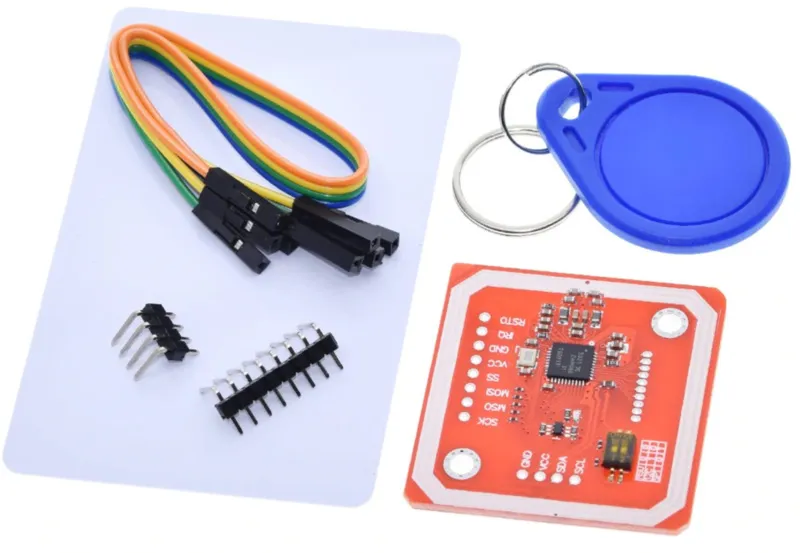
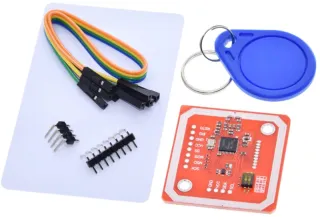
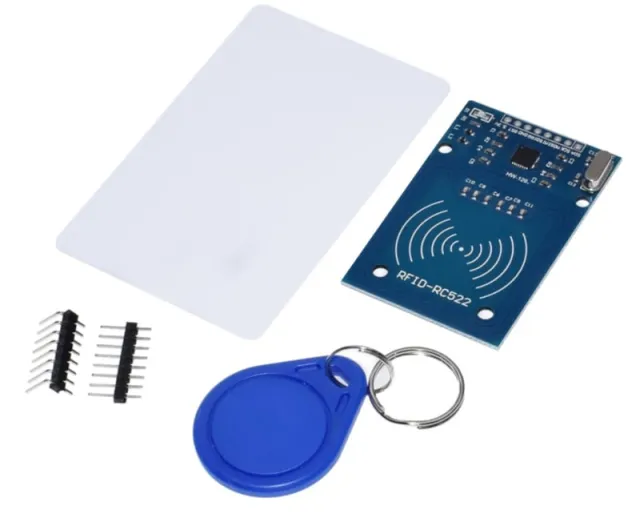
RFID/NFC-module voor Mifare- en FeliCa-tags met meerdere communicatiemodi.
SKU: OT2053-D82 Artikelnummer: NA144 EAN: 8499705714510 Locatie: D08.02
Alternatief
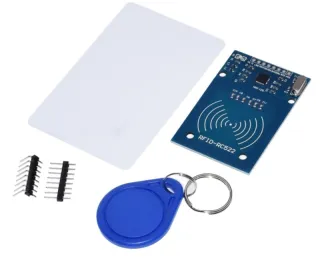
RFID-RC522 NFC Kit MFRC522 S50 Mifare incl. RFID Fudan Card en Key Tag
€ 2,20
Bekijk dit alternatief
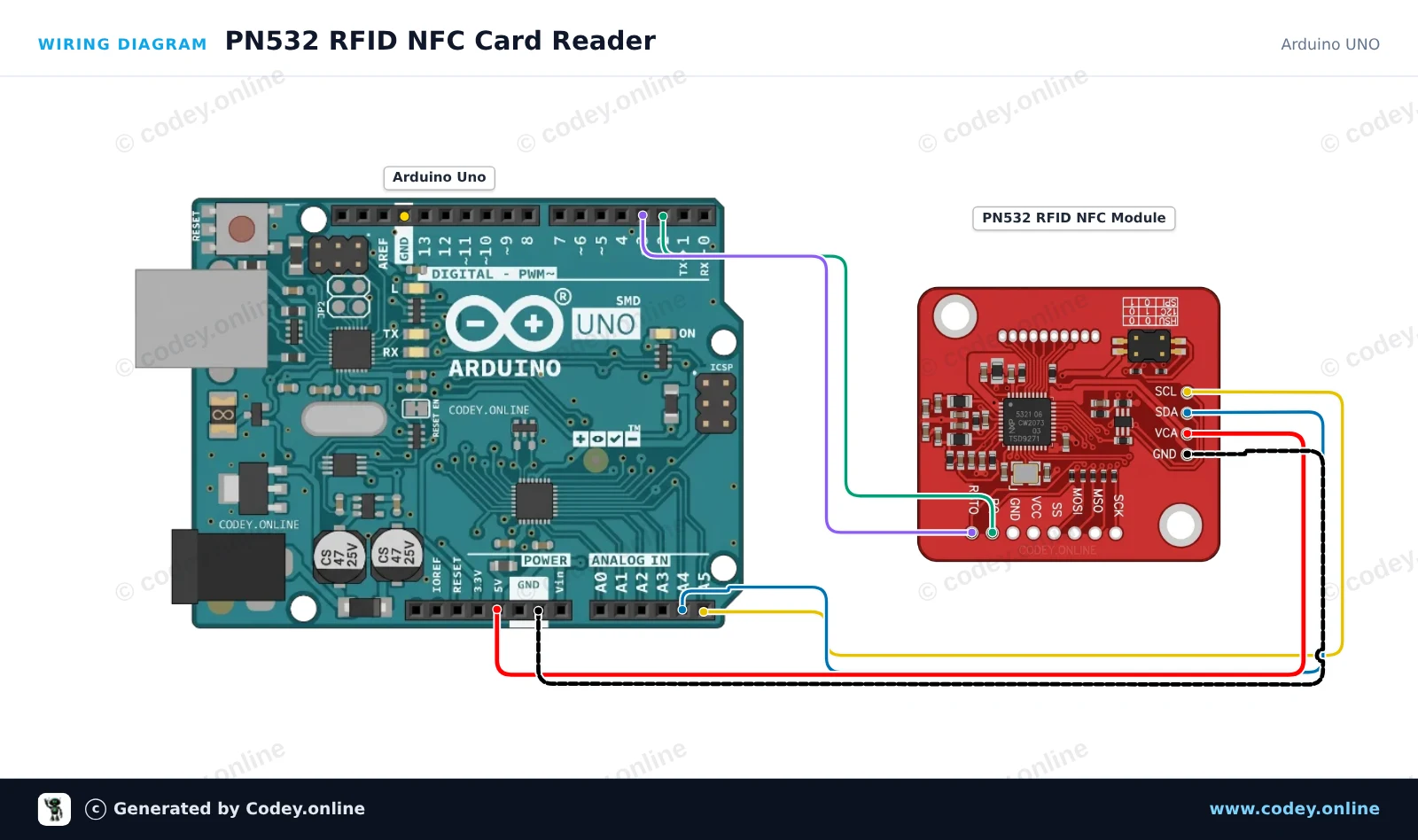
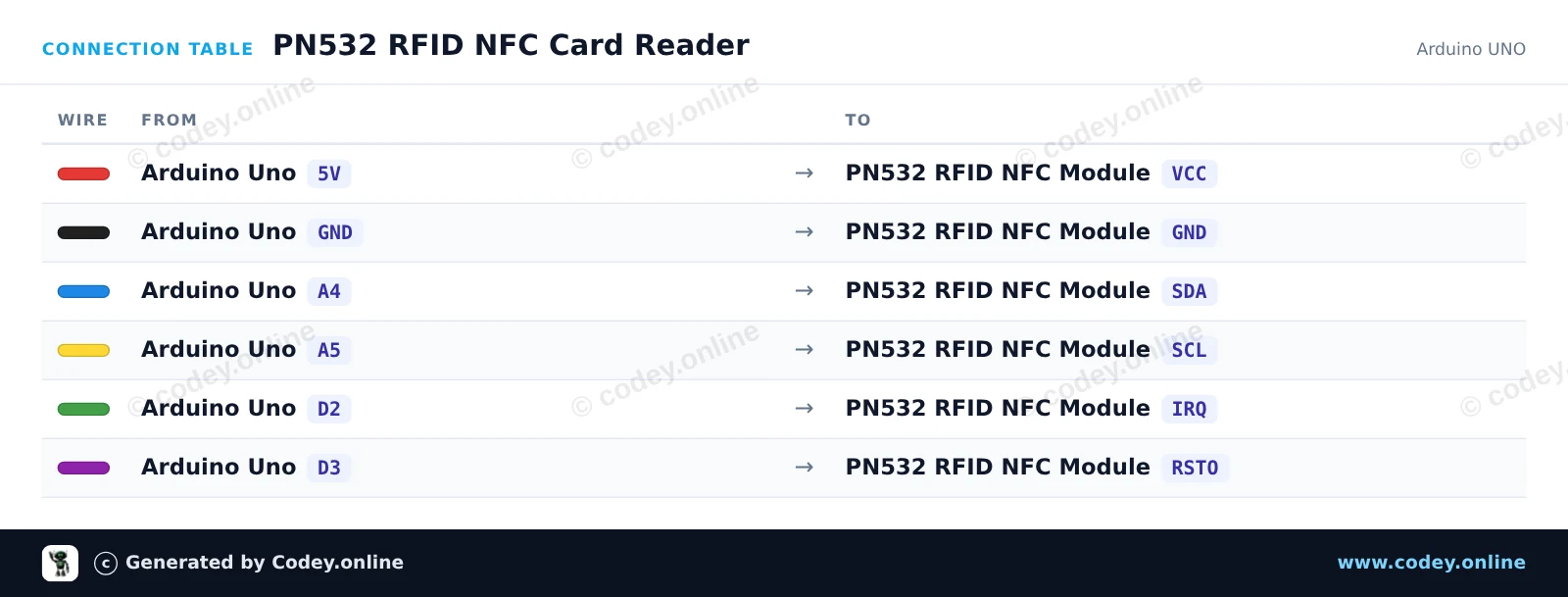
Zo sluit je de PN532 RFID NFC Kit met S50 Kaart en S50 Key Tag aan op een Arduino UNO of ESP32, met een voorbeeldsketch die je direct kunt uploaden.
Dit voorbeeld leest RFID/NFC-tags (zoals Mifare-kaarten) met de PN532-module via I2C. Zorg ervoor dat de DIP-schakelaars op de PN532-module zijn ingesteld op I2C-modus (meestal CH1=ON, CH2=OFF). Houd een compatibele 13.56MHz NFC- of RFID-tag dicht bij de module om de unieke UID in de Serial Monitor af te drukken.
/*
* ==================================================================
* Generated by Codey.online — https://www.codey.online
* ==================================================================
* Project : PN532 RFID NFC Card Reader
* Board : Arduino UNO (arduino:avr:uno)
* Parts : PN532 RFID NFC Module
* Libraries : Adafruit PN532 1.3.4
*
* Codey Online is an AI-powered browser IDE for Arduino and ESP32.
* Describe your project and Codey writes the code, draws the wiring
* diagram and uploads it to your board, straight from the browser.
* This code is free to use, modify and share, without warranty.
* ==================================================================
*/
#include <Wire.h>
#include <Adafruit_PN532.h>
#define PN532_IRQ 2
#define PN532_RESET 3
Adafruit_PN532 nfc(PN532_IRQ, PN532_RESET);
void setup() {
Serial.begin(115200);
while (!Serial) delay(10);
Serial.println(F("Initializing PN532 NFC Module..."));
nfc.begin();
uint32_t versiondata = nfc.getFirmwareVersion();
if (!versiondata) {
Serial.println(F("PN532 board not found. Check wiring and I2C mode switch."));
while (1) delay(10);
}
Serial.print(F("Found PN532 chip! Firmware ver: "));
Serial.print((versiondata >> 24) & 0xFF, HEX);
Serial.print('.');
Serial.println((versiondata >> 16) & 0xFF, HEX);
nfc.SAMConfig();
Serial.println(F("Waiting for an ISO14443A card or tag..."));
}
void loop() {
uint8_t uid[7];
uint8_t uidLength = 0;
bool success = nfc.readPassiveTargetID(PN532_MIFARE_ISO14443A, uid, &uidLength, 500);
if (success) {
Serial.print(F("Found tag! UID: "));
for (uint8_t i = 0; i < uidLength; i++) {
if (uid[i] < 0x10) Serial.print('0');
Serial.print(uid[i], HEX);
if (i < uidLength - 1) Serial.print(':');
}
Serial.println();
delay(1000);
}
}
Benodigde bibliotheken: Adafruit PN532 1.3.4
Wiring diagram and example code generated by Codey.online — https://www.codey.online
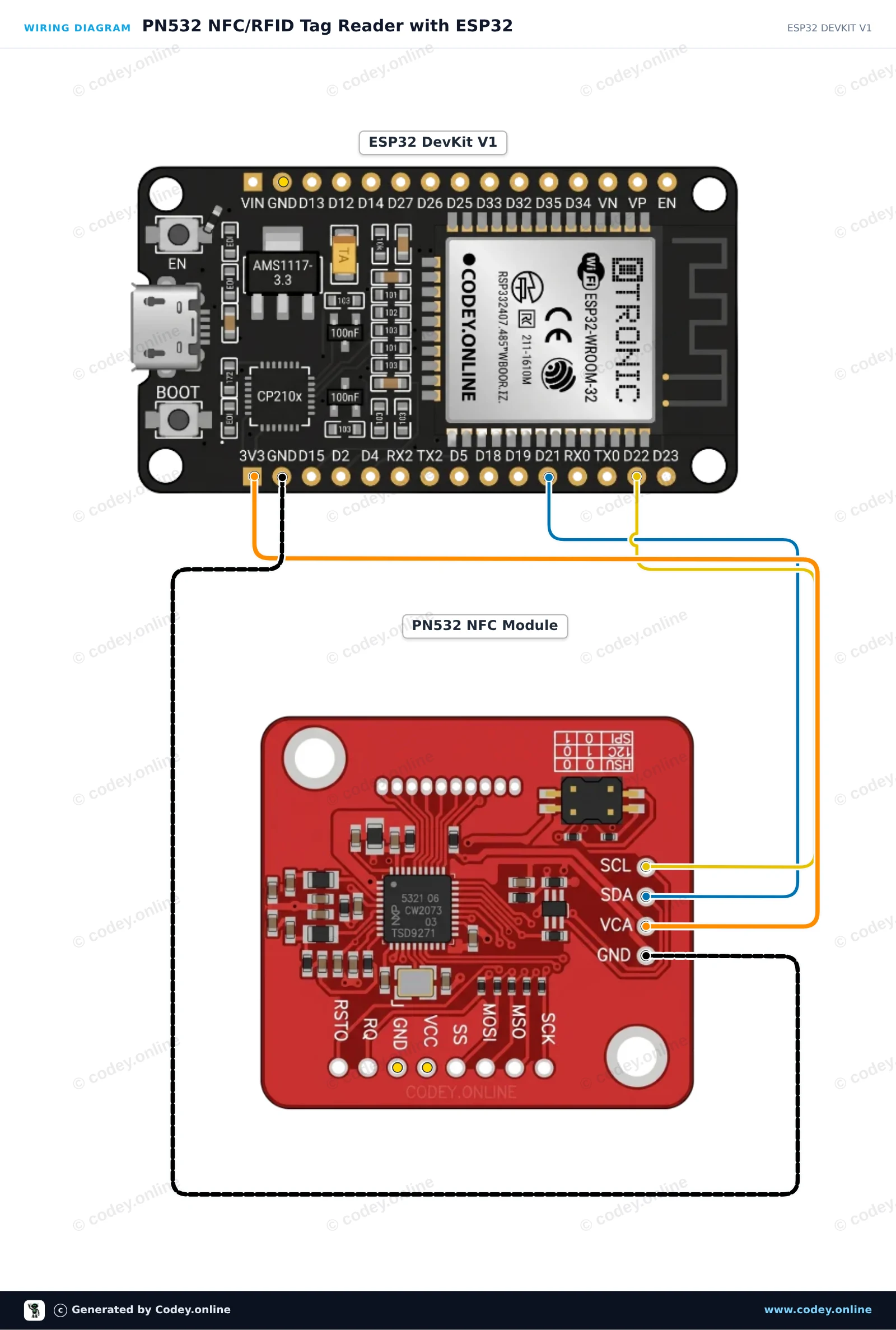
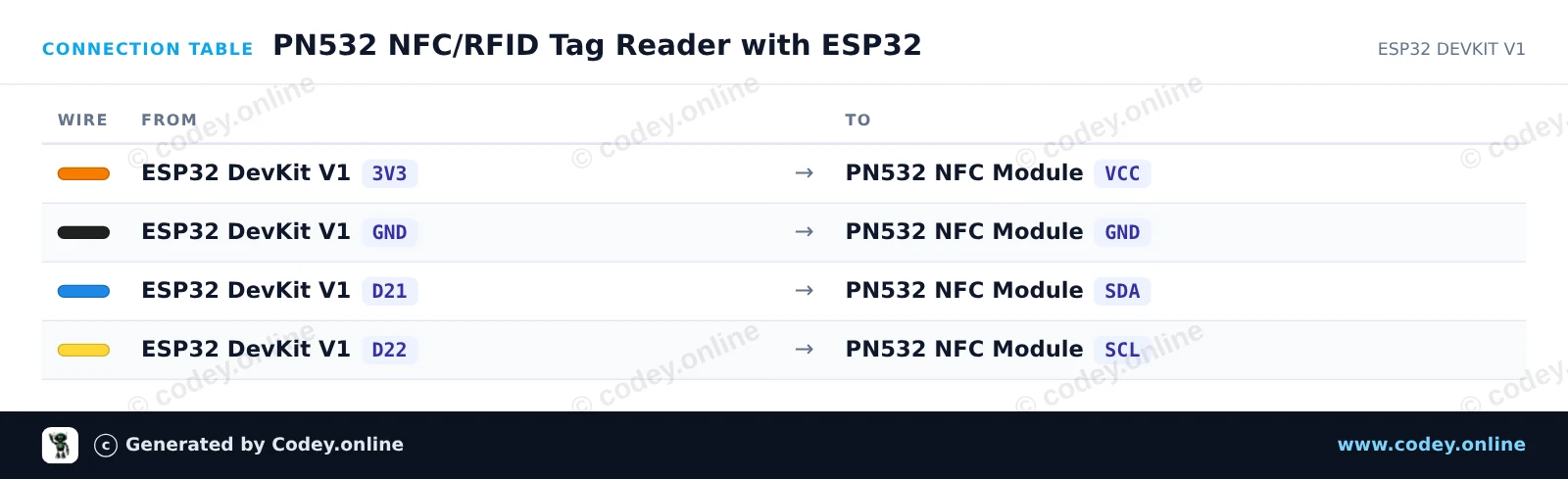
Dit circuit verbindt de PN532 NFC/RFID-module via I2C met de ESP32 om standaard 13.56 MHz RFID-tags of NFC-kaarten te lezen. Zorg ervoor dat de DIP-schakelaars van de module op I2C-modus staan (Channel 0=HIGH, Channel 1=LOW). Wanneer een kaart of sleutelhanger dicht bij de antenne wordt gehouden, leest de ESP32 de unieke ID (UID) en toont deze in de Serial Monitor.
/*
* ==================================================================
* Generated by Codey.online — https://www.codey.online
* ==================================================================
* Project : PN532 NFC/RFID Tag Reader with ESP32
* Board : ESP32 DEVKIT V1 (esp32:esp32:esp32doit-devkit-v1)
* Parts : PN532 RFID NFC Module
* Libraries : Adafruit PN532 1.3.4
*
* Codey Online is an AI-powered browser IDE for Arduino and ESP32.
* Describe your project and Codey writes the code, draws the wiring
* diagram and uploads it to your board, straight from the browser.
* This code is free to use, modify and share, without warranty.
* ==================================================================
*/
#include <Wire.h>
#include <Adafruit_PN532.h>
// Use I2C interface without dedicated IRQ/Reset pins
#define PN532_IRQ (-1)
#define PN532_RESET (-1)
Adafruit_PN532 nfc(PN532_IRQ, PN532_RESET);
void setup() {
Serial.begin(115200);
while (!Serial) delay(10);
Serial.println("Initializing PN532 NFC Reader...");
nfc.begin();
uint32_t versiondata = nfc.getFirmwareVersion();
if (!versiondata) {
Serial.println("PN532 not found! Check DIP switches (I2C mode) and wiring.");
while (1) delay(100);
}
Serial.print("Found PN532 chip with firmware version: ");
Serial.print((versiondata >> 16) & 0xFF, DEC);
Serial.print('.');
Serial.println((versiondata >> 8) & 0xFF, DEC);
// Configure Secure Access Module (SAM)
nfc.SAMConfig();
Serial.println("Ready! Present an RFID card or NFC tag to the reader...");
}
void loop() {
uint8_t success;
uint8_t uid[] = { 0, 0, 0, 0, 0, 0, 0 };
uint8_t uidLength;
// Wait up to 500ms for an ISO14443A card
success = nfc.readPassiveTargetID(PN532_MIFARE_ISO14443A, uid, &uidLength, 500);
if (success) {
Serial.println("Card detected!");
Serial.print("UID Length: ");
Serial.print(uidLength, DEC);
Serial.println(" bytes");
Serial.print("UID: ");
nfc.PrintHex(uid, uidLength);
Serial.println();
delay(1000); // Debounce to avoid repeated rapid reads
}
}
Benodigde bibliotheken: Adafruit PN532 1.3.4
Wiring diagram and example code generated by Codey.online — https://www.codey.online
Deze PN532 RFID module kan naast zenden en ontvangen van Mifare tags ook zelf data verzenden via NFC.
De module kan worden aangestuurd via SPI, I2C of UART.
Specificaties:
Zoektermen: rfid, rfid kit, rfid-kit, rfid set, nfc set, nfc kit
Afmetingen
Lengte: 4,3cm
Breedte: 4cm
Hoogte: 0,3cm
| Afmetingen | 4,3 x 4 x 0,3 cm |
|---|---|
| Interface | SPI, I2C of UART |
| Geschikt voor | 5V systemen |
| Chip | NXP PN532 |
| Montagegaten | 2 x 3 mm |
| Leesafstand | tot ~5-7cm |
Ik moet er nog mee gaan beginnen, maar ziet er uit volgens verwachting
Niet tevreden? Je hebt 30 dagen bedenktijd na ontvangst om het product terug te sturen.
Alles over retourneren
PN532 RFID NFC Kit met S50 Kaart en S50 Key Tag