Ordered on weekdays before 14:00 = shipped the same day and delivered the next day in 98% of cases. Free returns 30-day reflection period 1-year warranty

Wiring diagram and code example

How to connect the PN532 RFID NFC Kit with S50 Card and S50 Key Tag to an Arduino UNO or ESP32, with an example sketch you can upload straight away.

PN532 RFID NFC Card Reader

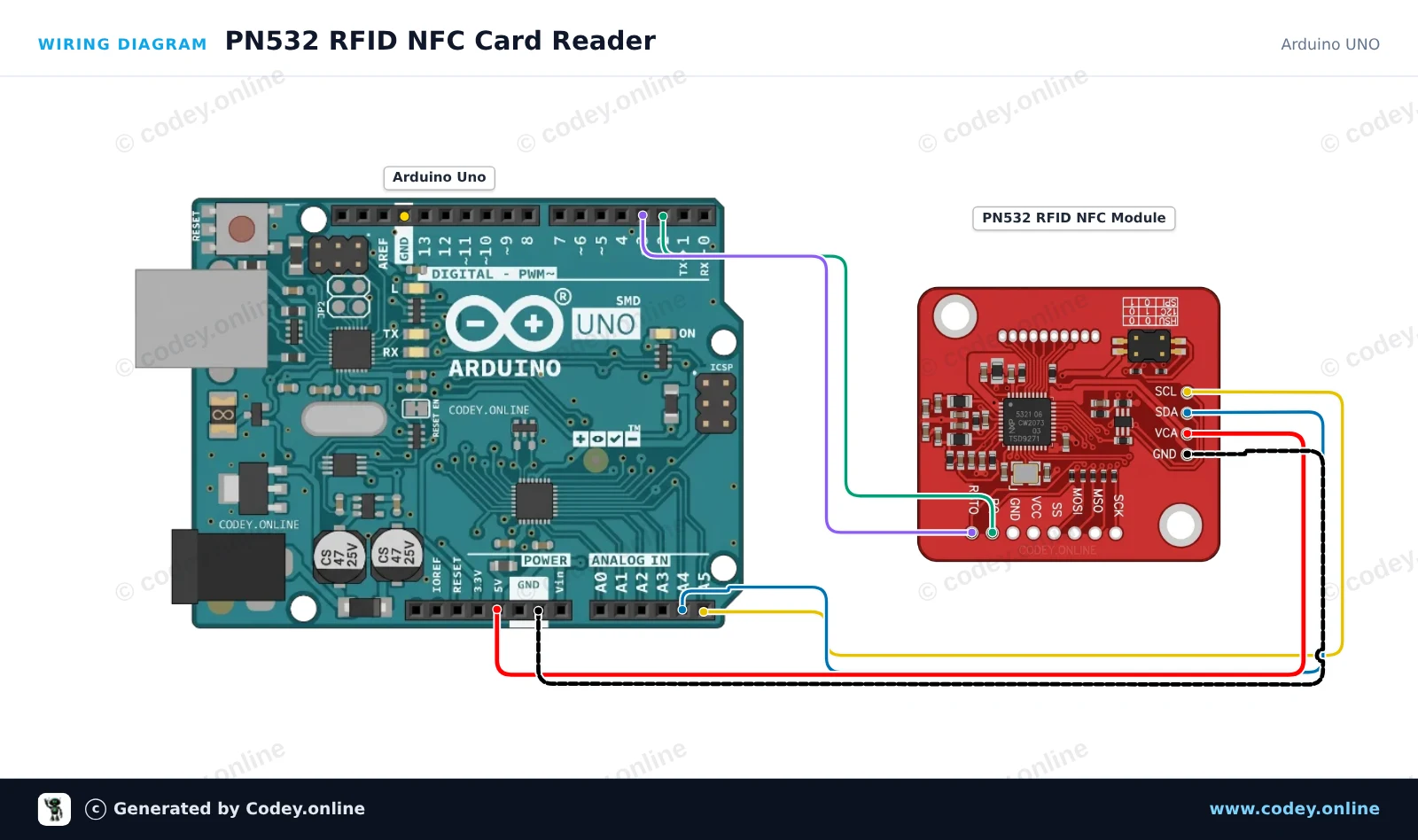
This example reads RFID/NFC tags (such as Mifare cards) using the PN532 module over I2C. Make sure the DIP switches on the PN532 module are set for I2C mode (usually CH1=ON, CH2=OFF). Hold any compatible 13.56MHz NFC or RFID tag near the module to print its unique UID to the Serial Monitor.

Wiring diagram: PN532 RFID NFC Kit with S50 Card and S50 Key Tag on an Arduino UNO
Wiring diagram · Click to enlarge
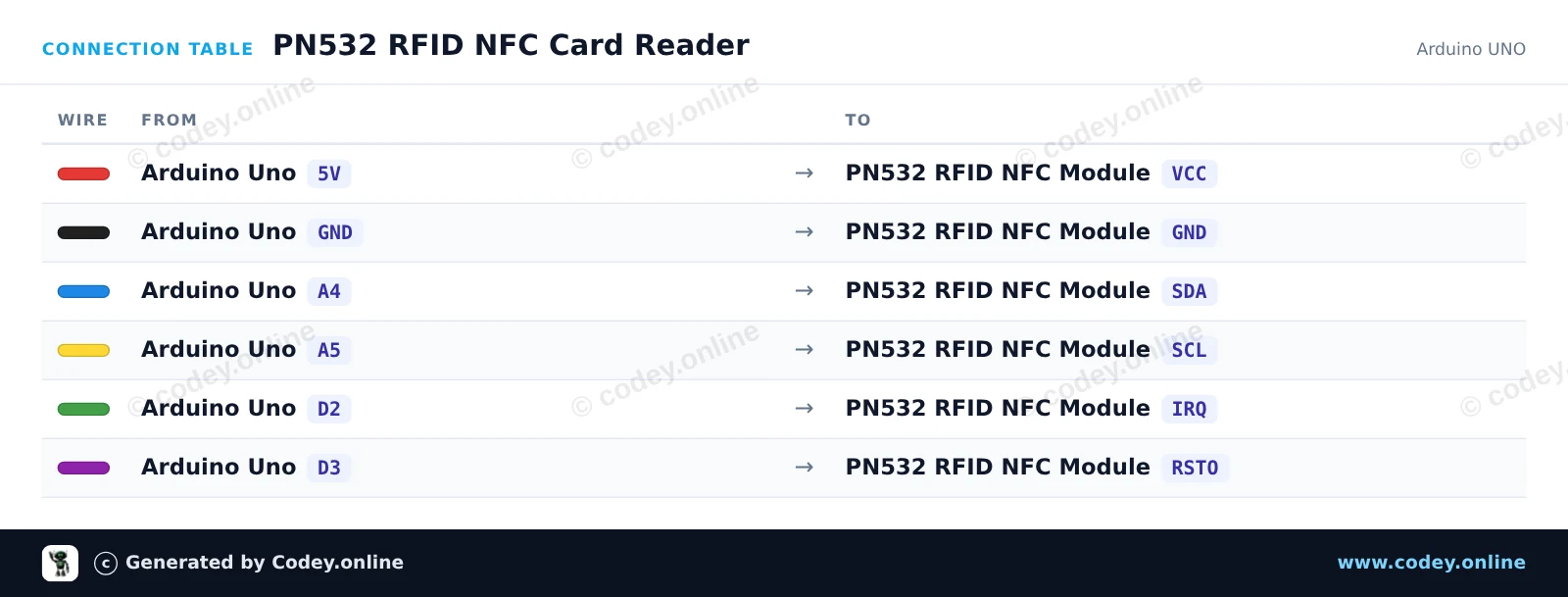
Connection table: PN532 RFID NFC Kit with S50 Card and S50 Key Tag on an Arduino UNO
Connection table · Click to enlarge
PN532_RFID_NFC_Card_Reader.ino · compiled and verified
/*
 * ==================================================================
 *  Generated by Codey.online  —  https://www.codey.online
 * ==================================================================
 *  Project   : PN532 RFID NFC Card Reader
 *  Board     : Arduino UNO (arduino:avr:uno)
 *  Parts     : PN532 RFID NFC Module
 *  Libraries : Adafruit PN532 1.3.4
 *
 *  Codey Online is an AI-powered browser IDE for Arduino and ESP32.
 *  Describe your project and Codey writes the code, draws the wiring
 *  diagram and uploads it to your board, straight from the browser.
 *  This code is free to use, modify and share, without warranty.
 * ==================================================================
 */

#include <Wire.h>
#include <Adafruit_PN532.h>

#define PN532_IRQ   2
#define PN532_RESET 3

Adafruit_PN532 nfc(PN532_IRQ, PN532_RESET);

void setup() {
  Serial.begin(115200);
  while (!Serial) delay(10);

  Serial.println(F("Initializing PN532 NFC Module..."));
  nfc.begin();

  uint32_t versiondata = nfc.getFirmwareVersion();
  if (!versiondata) {
    Serial.println(F("PN532 board not found. Check wiring and I2C mode switch."));
    while (1) delay(10);
  }

  Serial.print(F("Found PN532 chip! Firmware ver: "));
  Serial.print((versiondata >> 24) & 0xFF, HEX);
  Serial.print('.');
  Serial.println((versiondata >> 16) & 0xFF, HEX);

  nfc.SAMConfig();
  Serial.println(F("Waiting for an ISO14443A card or tag..."));
}

void loop() {
  uint8_t uid[7];
  uint8_t uidLength = 0;

  bool success = nfc.readPassiveTargetID(PN532_MIFARE_ISO14443A, uid, &uidLength, 500);
  if (success) {
    Serial.print(F("Found tag! UID: "));
    for (uint8_t i = 0; i < uidLength; i++) {
      if (uid[i] < 0x10) Serial.print('0');
      Serial.print(uid[i], HEX);
      if (i < uidLength - 1) Serial.print(':');
    }
    Serial.println();
    delay(1000);
  }
}

Required libraries: Adafruit PN532 1.3.4

Wiring diagram and example code generated by Codey.online — https://www.codey.online

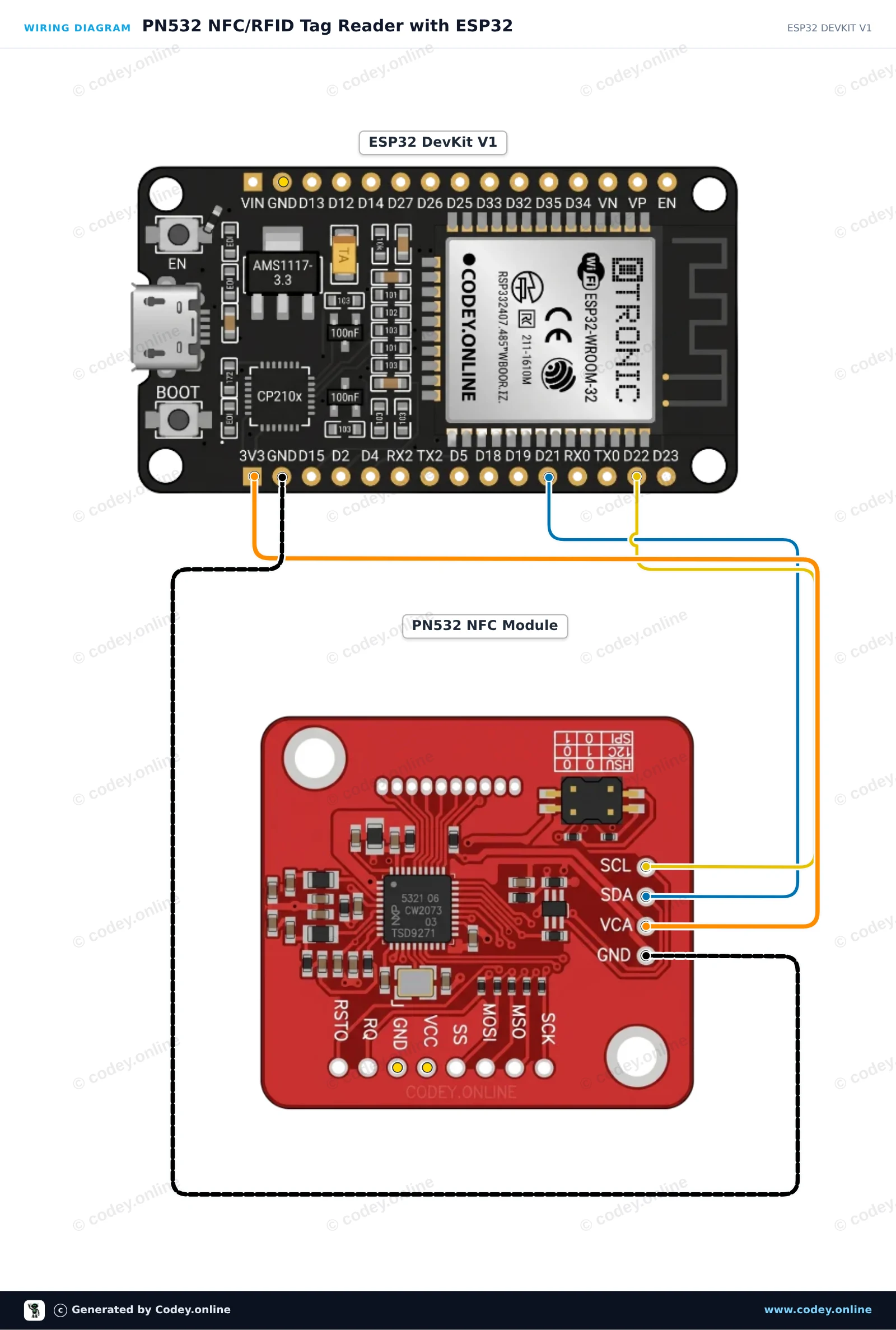
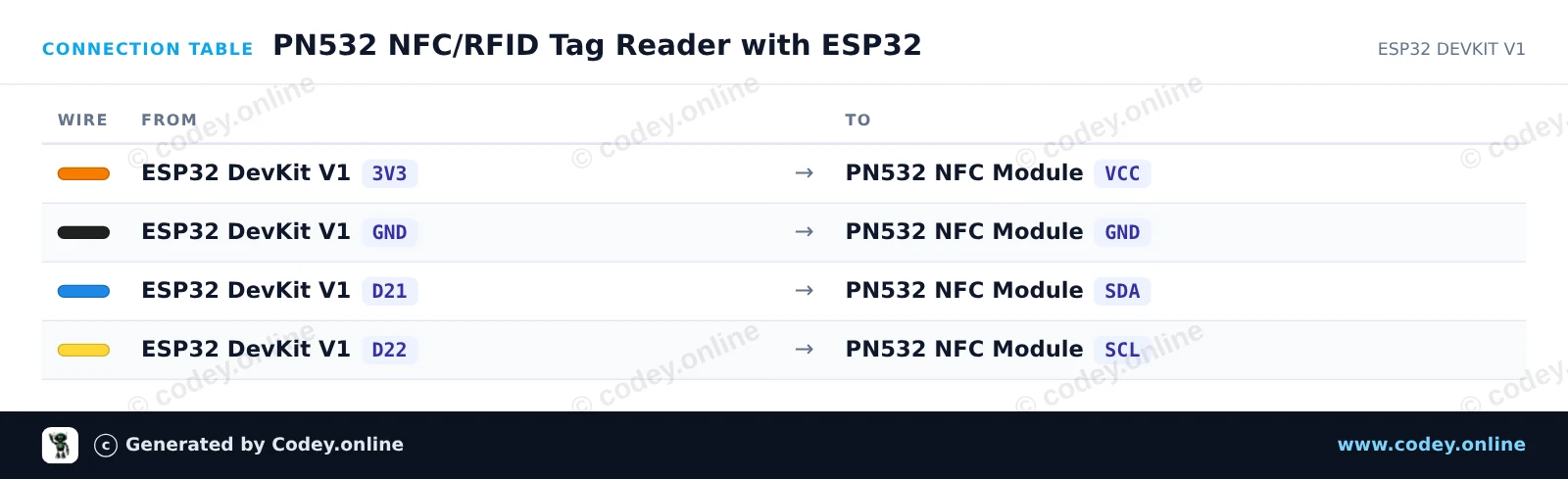
PN532 NFC/RFID Tag Reader with ESP32

This circuit connects the PN532 NFC/RFID module to the ESP32 over I2C to read standard 13.56 MHz RFID tags or NFC cards. Ensure the module's DIP switches are set to I2C mode (Channel 0=HIGH, Channel 1=LOW). When a card or key fob is placed near the antenna, the ESP32 reads and prints its unique ID (UID) to the Serial Monitor.

Wiring diagram: PN532 RFID NFC Kit with S50 Card and S50 Key Tag on an ESP32 DevKit V1
Wiring diagram · Click to enlarge
Connection table: PN532 RFID NFC Kit with S50 Card and S50 Key Tag on an ESP32 DevKit V1
Connection table · Click to enlarge
PN532_NFC_RFID_Tag_Reader_with_ESP32.ino · compiled and verified
/*
 * ==================================================================
 *  Generated by Codey.online  —  https://www.codey.online
 * ==================================================================
 *  Project   : PN532 NFC/RFID Tag Reader with ESP32
 *  Board     : ESP32 DEVKIT V1 (esp32:esp32:esp32doit-devkit-v1)
 *  Parts     : PN532 RFID NFC Module
 *  Libraries : Adafruit PN532 1.3.4
 *
 *  Codey Online is an AI-powered browser IDE for Arduino and ESP32.
 *  Describe your project and Codey writes the code, draws the wiring
 *  diagram and uploads it to your board, straight from the browser.
 *  This code is free to use, modify and share, without warranty.
 * ==================================================================
 */

#include <Wire.h>
#include <Adafruit_PN532.h>

// Use I2C interface without dedicated IRQ/Reset pins
#define PN532_IRQ   (-1)
#define PN532_RESET (-1)

Adafruit_PN532 nfc(PN532_IRQ, PN532_RESET);

void setup() {
  Serial.begin(115200);
  while (!Serial) delay(10);

  Serial.println("Initializing PN532 NFC Reader...");
  nfc.begin();

  uint32_t versiondata = nfc.getFirmwareVersion();
  if (!versiondata) {
    Serial.println("PN532 not found! Check DIP switches (I2C mode) and wiring.");
    while (1) delay(100);
  }

  Serial.print("Found PN532 chip with firmware version: ");
  Serial.print((versiondata >> 16) & 0xFF, DEC);
  Serial.print('.');
  Serial.println((versiondata >> 8) & 0xFF, DEC);

  // Configure Secure Access Module (SAM)
  nfc.SAMConfig();

  Serial.println("Ready! Present an RFID card or NFC tag to the reader...");
}

void loop() {
  uint8_t success;
  uint8_t uid[] = { 0, 0, 0, 0, 0, 0, 0 };
  uint8_t uidLength;

  // Wait up to 500ms for an ISO14443A card
  success = nfc.readPassiveTargetID(PN532_MIFARE_ISO14443A, uid, &uidLength, 500);

  if (success) {
    Serial.println("Card detected!");
    Serial.print("UID Length: ");
    Serial.print(uidLength, DEC);
    Serial.println(" bytes");
    Serial.print("UID: ");
    nfc.PrintHex(uid, uidLength);
    Serial.println();

    delay(1000); // Debounce to avoid repeated rapid reads
  }
}

Required libraries: Adafruit PN532 1.3.4

Wiring diagram and example code generated by Codey.online — https://www.codey.online

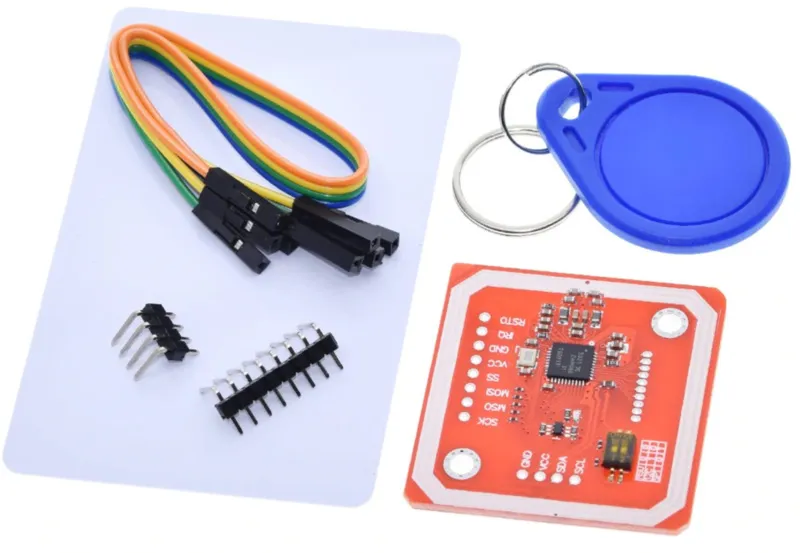
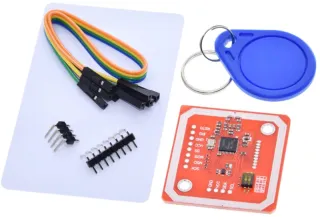
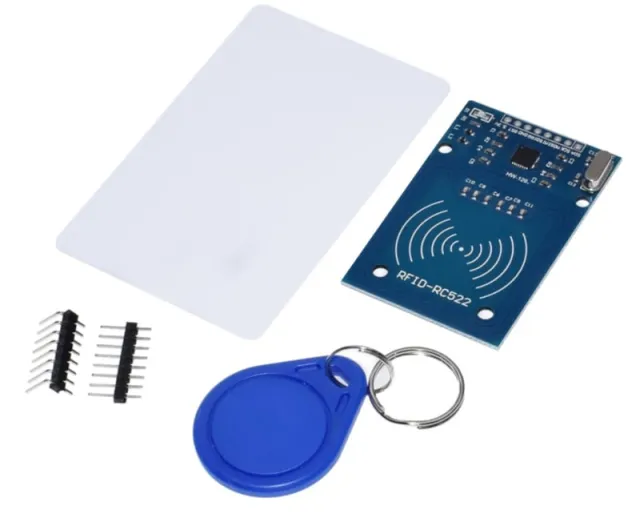
PN532 RFID NFC Kit with S50 Card and S50 Key Tag

This PN532 RFID module can, in addition to transmitting and receiving Mifare tags, also transmit data itself via NFC.
The module can be controlled via SPI, I2C or UART.

Specifications:

  • Chip: NXP PN532
  • Voltage: 3.3 - 5V DC
  • Supports various RFID products including Mifare and FeliCa
  • Read range: up to ~5-7cm
  • Level shifter for I2C and UART present for compatibility with 5V systems (SPI only 3.3V!)
  • Two DIP switches present for selecting communication mode (HSU=High Speed UART)
  • Supplied with an S50 card, S50 key tag, 4-pin bent header and cable
  • Two 3mm mounting holes present

Search terms: rfid, rfid kit, rfid-kit, rfid set, nfc set, nfc kit

Dimensions
Length: 4.3cm
Width: 4cm
Height: 0.3cm

  • PN532 chip
  • Complete delivery
  • DIP switches
  • 2 mounting holes

Why choose this product?

  • Multiple protocols – Control via SPI, I2C or UART.
  • Send NFC data – Can transmit data via NFC itself.
  • Compatible with 5V – Level shifter for I2C and UART included.
  • Complete delivery – Includes card, key tag, header and cable.
  • Easy mounting – Two 3 mm mounting holes included.
Specifications
Dimensions4,3 x 4 x 0,3 cm
InterfaceSPI, I2C or UART
Suitable for5V systems
ChipNXP PN532
Mounting holes2 x 3 mm
Reading distanceup to ~5-7cm

In the package

  • PN532 RFID module
  • S50 card
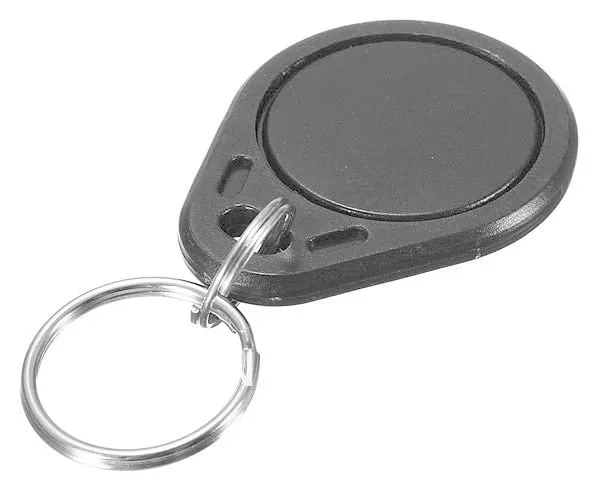
  • S50 key tag
  • 4-pin bent header
  • cable

Frequently bought together

Total: € 10,80

Reviews

★★★★★ 5,0/5 1 review
  • ★★★★★Anoniem

    I still need to start using it, but it looks as expected

Write a review
Your rating

Shipping & returns

Shipping

  • Parcel with track & trace€ 7,70Within 24 hours
  • Pick up at PostNL location€ 7,40Within 24 hours
  • Letterbox parcel€ 3,70Within 2 business days
  • Letterbox parcel 24 hours€ 4,55Within 24 hours
  • Pick up in storeFree
All about shipping

Returns

Not satisfied? You have 30 days after delivery to return the product.

All about returns

Recently viewed