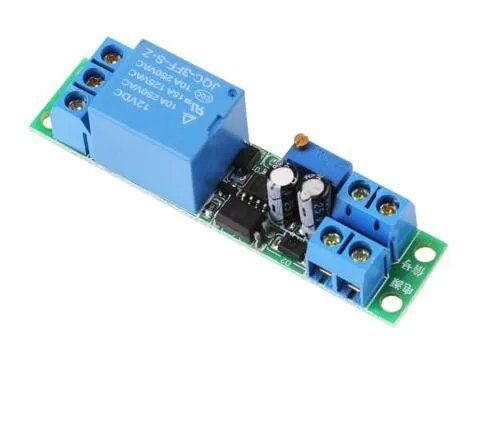
SKU: OT3260 Article number: NA445 EAN: 8720618231529

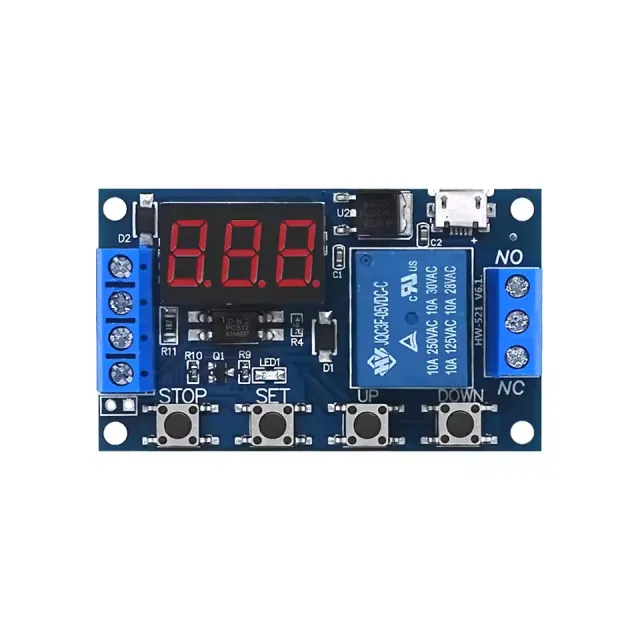
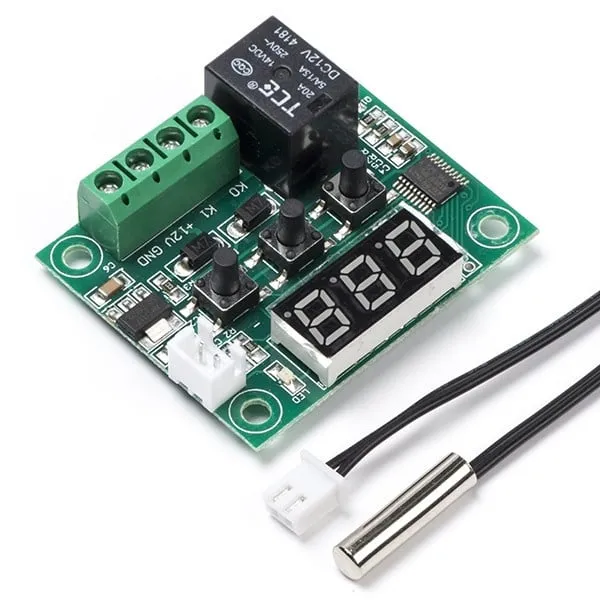
This time-delay relay module operates on 12V and can be adjusted using the trimmer potentiometer.
Operating voltage: DC 12V
Current consumption (when switched on): ~46mA
Maximum voltage through relay: 30VDC or 250VAC
Maximum current through relay: 10A
Adjustable delay between 0.1 and 25 seconds
For instructions and a wiring diagram, we have the OTRONIC Quick Start Guide for the 12V adjustable time delay relay module available for you.
Instructions:
This OTRONIC® adjustable time delay relay module has an adjustable delay for switch-off (drop-out).
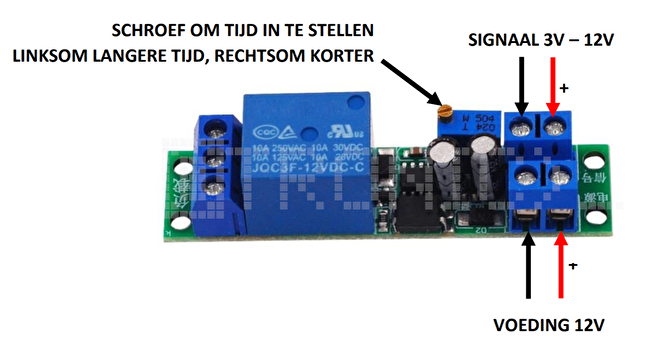
Testing the relay
You can test the set time of the relay without an external control signal.
Connect 12V power supply to VCC and GND (Power supply). Without a signal, the relay will perform the
time delay once. You can hear this by the click of the relay.
Use the trimmer potentiometer to adjust the time. Turn counterclockwise for a longer time and clockwise
for a shorter time.
NOTE: Multiple turns of the trimmer are required to adjust the time.
Dimensions
Length: 6.68cm
Width: 1.6cm
Height: 1.68cm
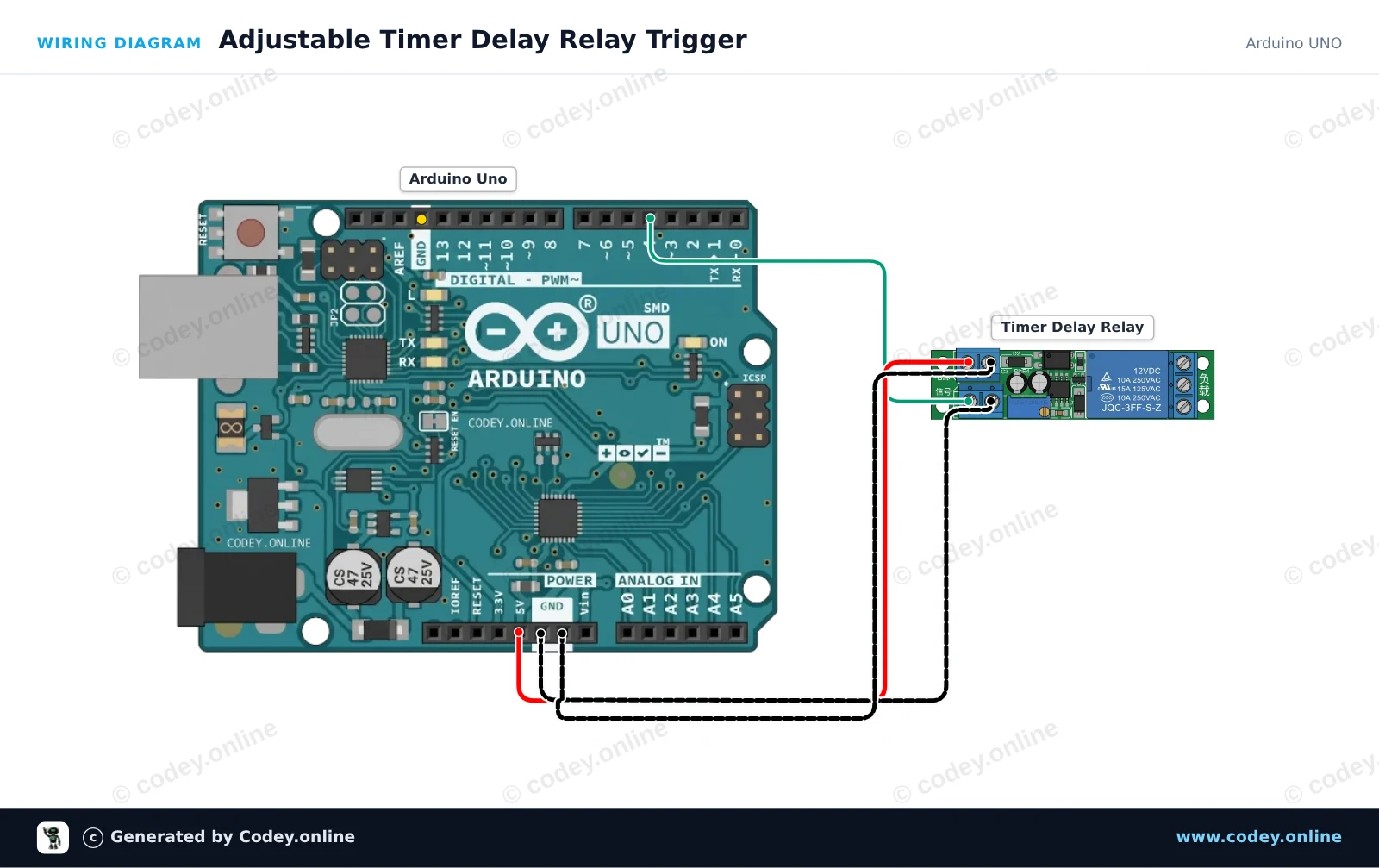
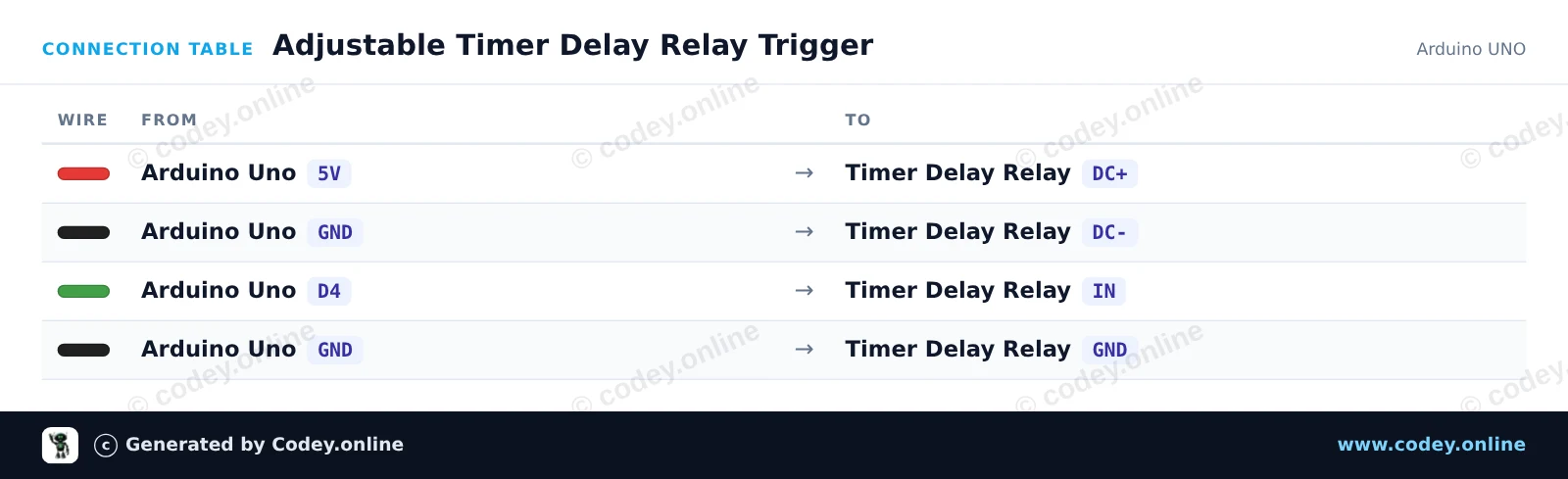
How to connect the 12V adjustable time delay relay module to an Arduino UNO or ESP32, with an example sketch you can upload straight away.
This project demonstrates how to trigger an adjustable timer delay relay module using an Arduino Uno. The Arduino sends a short pulse from digital pin 4 to the IN trigger pin, activating the onboard timer delay cycle. Adjust the potentiometer on the relay module to change the duration of the relay activation.
/*
 * ==================================================================
 *  Generated by Codey.online  —  https://www.codey.online
 * ==================================================================
 *  Project   : Adjustable Timer Delay Relay Trigger
 *  Board     : Arduino UNO (arduino:avr:uno)
 *  Parts     : DC 12V adjustable timer delay, time delay relay turn off switch module time relay time switch 0~25sec for smart home, automatic control
 *  Libraries : none (built-in)
 *
 *  Codey Online is an AI-powered browser IDE for Arduino and ESP32.
 *  Describe your project and Codey writes the code, draws the wiring
 *  diagram and uploads it to your board, straight from the browser.
 *  This code is free to use, modify and share, without warranty.
 * ==================================================================
 */

// Timer Delay Relay Module Demo
// Sends a trigger pulse to start the module's countdown delay.

const int triggerPin = 4;

void setup() {
  pinMode(triggerPin, OUTPUT);
  digitalWrite(triggerPin, LOW);

  Serial.begin(115200);
  Serial.println(F("Timer Delay Relay Demo Initialized."));
}

void loop() {
  Serial.println(F("Triggering relay delay cycle..."));

  // Send a 200 ms HIGH pulse to trigger the module
  digitalWrite(triggerPin, HIGH);
  delay(200);
  digitalWrite(triggerPin, LOW);

  Serial.println(F("Trigger sent. Waiting for delay cycle to complete..."));

  // Wait 10 seconds before triggering the next cycle
  delay(10000);
}Wiring diagram and example code generated by Codey.online — https://www.codey.online
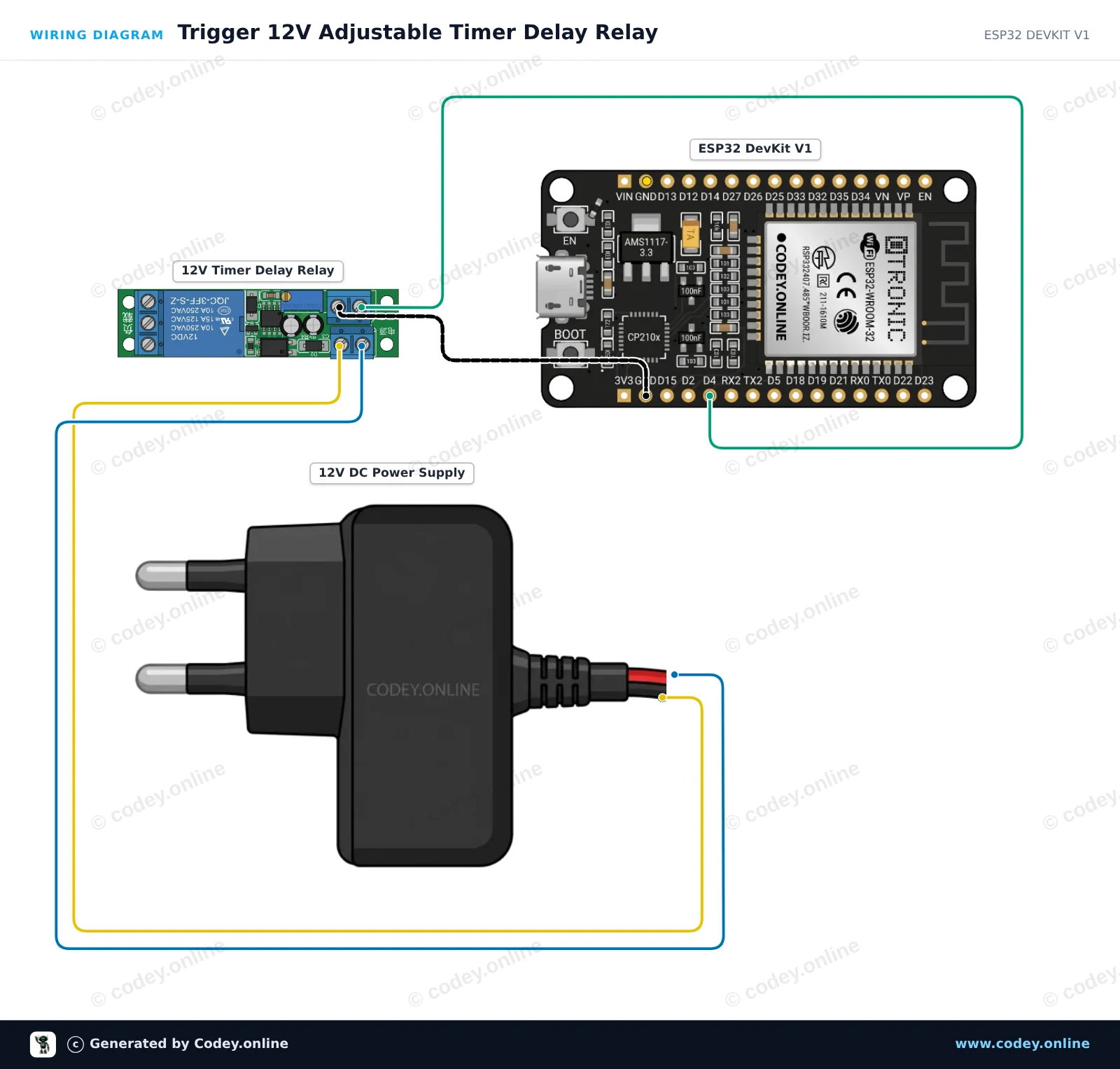
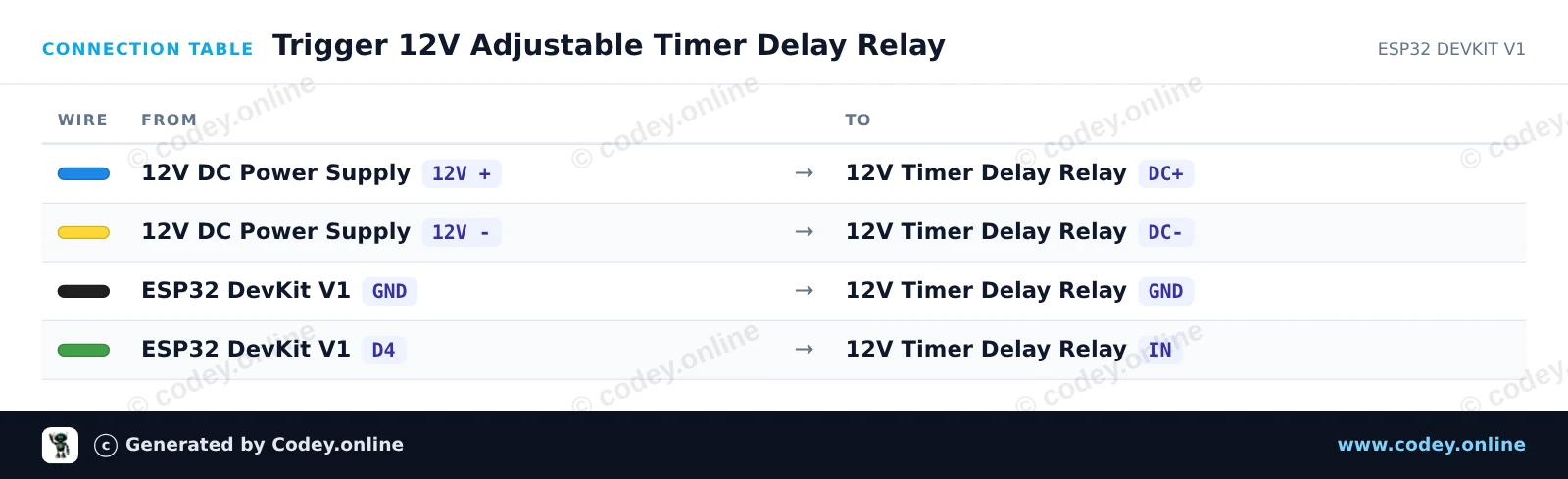
This project demonstrates triggering an adjustable 12V time delay relay module using an ESP32. The ESP32 sends a short trigger pulse to start the countdown, and the relay stays energized for the duration set by the onboard potentiometer (0 to 25 seconds).
/*
 * ==================================================================
 *  Generated by Codey.online  —  https://www.codey.online
 * ==================================================================
 *  Project   : Trigger 12V Adjustable Timer Delay Relay
 *  Board     : ESP32 DEVKIT V1 (esp32:esp32:esp32doit-devkit-v1)
 *  Parts     : DC 12V adjustable timer delay, time delay relay turn off switch module time relay time switch 0~25sec for smart home, automatic control
 *  Libraries : none (built-in)
 *
 *  Codey Online is an AI-powered browser IDE for Arduino and ESP32.
 *  Describe your project and Codey writes the code, draws the wiring
 *  diagram and uploads it to your board, straight from the browser.
 *  This code is free to use, modify and share, without warranty.
 * ==================================================================
 */

// Pin connected to the IN trigger pin of the timer relay module
const int TRIGGER_PIN = 4;

void setup() {
  Serial.begin(115200);
  pinMode(TRIGGER_PIN, OUTPUT);
  digitalWrite(TRIGGER_PIN, LOW);

  Serial.println("ESP32 12V Timer Delay Relay Module Initialized");
  delay(1000);
}

void loop() {
  Serial.println("Sending trigger pulse...");

  // Send a 200 ms pulse to activate the timer
  digitalWrite(TRIGGER_PIN, HIGH);
  delay(200);
  digitalWrite(TRIGGER_PIN, LOW);

  Serial.println("Triggered! The relay will remain active for the duration set by the potentiometer.");

  // Wait 15 seconds before triggering the next cycle
  delay(15000);
}Wiring diagram and example code generated by Codey.online — https://www.codey.online







 Nederlands
  Suomi
Suomi  Български
  Hrvatski
  Frans
Frans  Deutsch
  Italiano
  Español
  Polski
  Dansk
Dansk  Ελληνικά
  Čeština
  Svenska
  Aileen