Ordered on weekdays before 14:00 = shipped the same day and delivered the next day in 98% of cases. Free returns 30-day reflection period 1-year warranty

Wiring diagram and code example

How to connect the 3.3V Micro SD card module for ESP32 | ESP8266 to an Arduino UNO or ESP32, with an example sketch you can upload straight away.

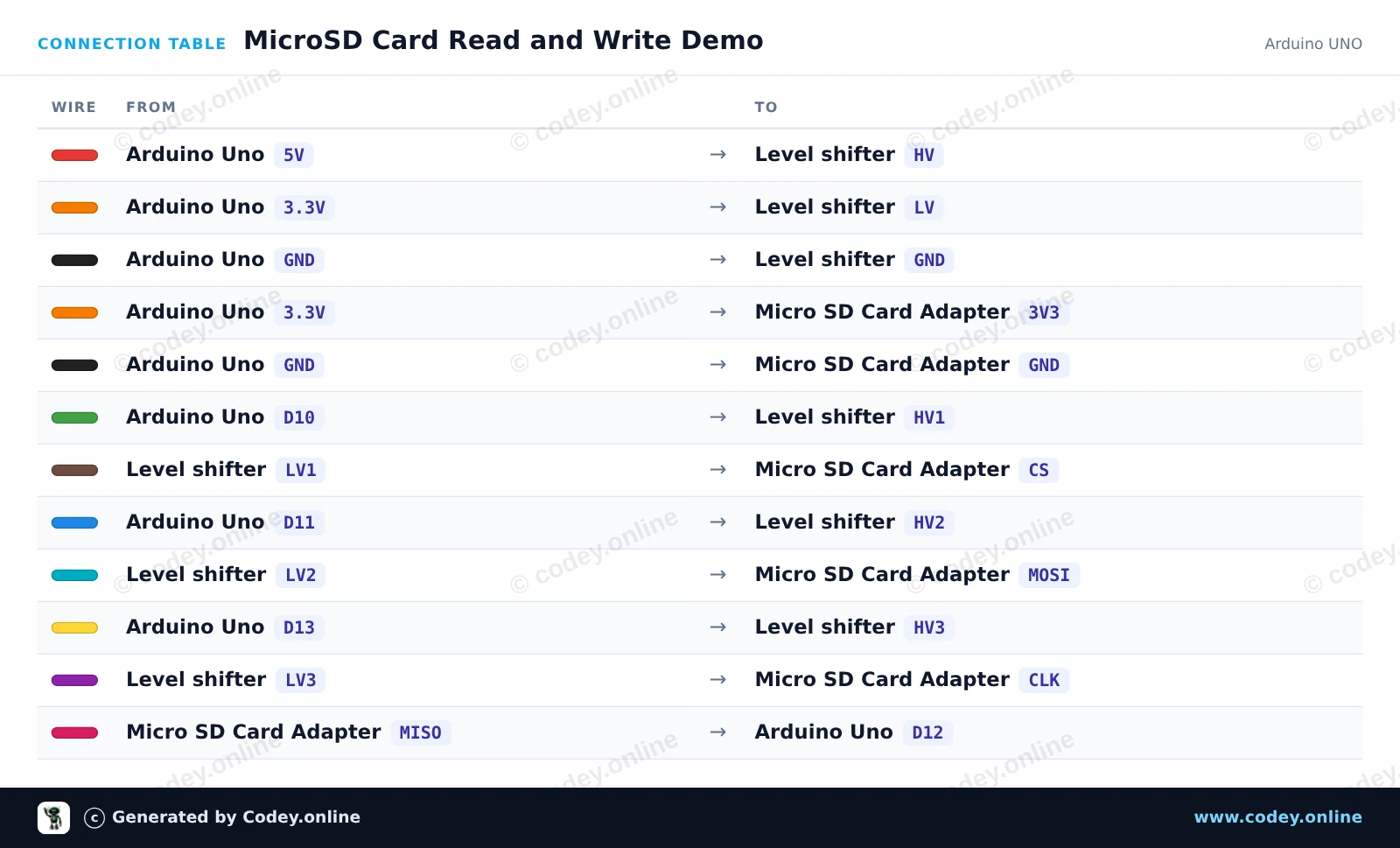
MicroSD Card Read and Write Demo

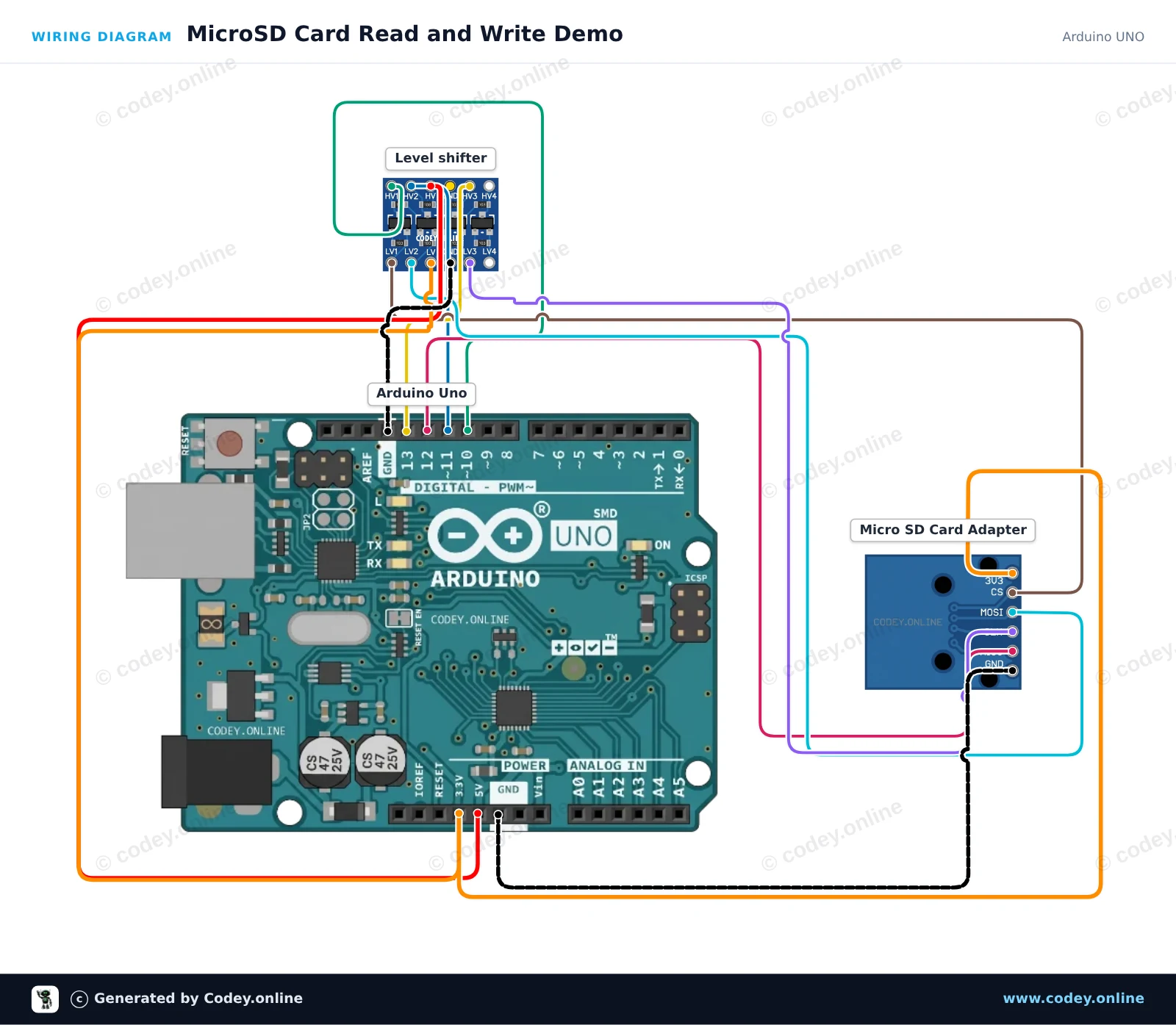
This project demonstrates writing text to a microSD card and reading it back via SPI. A 4-channel logic level shifter safely translates the Arduino Uno's 5V logic signals down to 3.3V for the microSD card module. Open the Serial Monitor at 115200 baud to view the initialization status and file contents.

Wiring diagram: 3.3V Micro SD card module for ESP32 | ESP8266 on an Arduino UNO
Wiring diagram · Click to enlarge
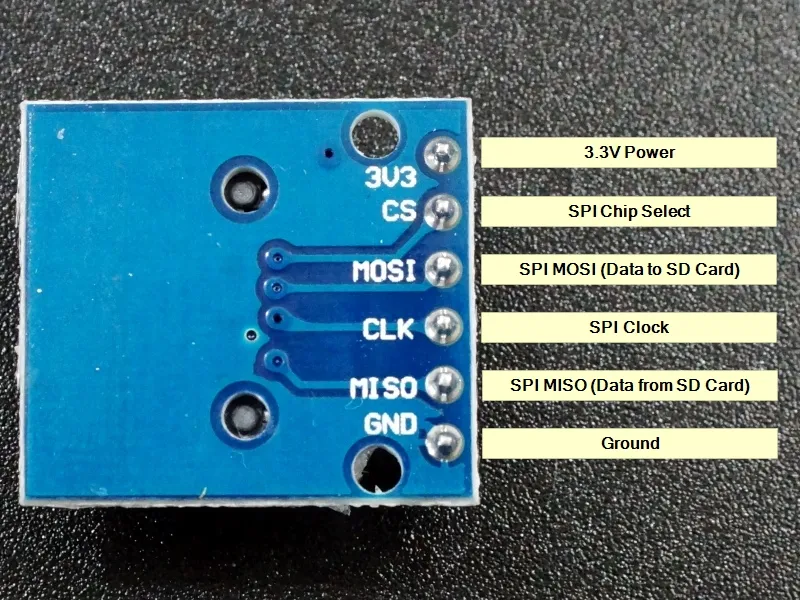
Connection table: 3.3V Micro SD card module for ESP32 | ESP8266 on an Arduino UNO
Connection table · Click to enlarge
MicroSD_Card_Read_and_Write_Demo.ino · compiled and verified
/*
 * ==================================================================
 *  Generated by Codey.online  —  https://www.codey.online
 * ==================================================================
 *  Project   : MicroSD Card Read and Write Demo
 *  Board     : Arduino UNO (arduino:avr:uno)
 *  Parts     : Micro SD Card Adapter Module 3.3V
 *  Libraries : none (built-in)
 *
 *  Codey Online is an AI-powered browser IDE for Arduino and ESP32.
 *  Describe your project and Codey writes the code, draws the wiring
 *  diagram and uploads it to your board, straight from the browser.
 *  This code is free to use, modify and share, without warranty.
 * ==================================================================
 */

#include <SPI.h>
#include <SD.h>

const int chipSelect = 10;

void setup() {
  Serial.begin(115200);
  while (!Serial) {
    ; // Wait for serial port to connect
  }

  Serial.println(F("Initializing SD card..."));

  if (!SD.begin(chipSelect)) {
    Serial.println(F("Initialization failed! Check connections & SD card."));
    return;
  }
  Serial.println(F("Initialization done."));

  // Write to file
  File myFile = SD.open("demo.txt", FILE_WRITE);
  if (myFile) {
    Serial.println(F("Writing to demo.txt..."));
    myFile.println(F("MicroSD card read/write test successful!"));
    myFile.close();
    Serial.println(F("Done writing."));
  } else {
    Serial.println(F("Error opening demo.txt for writing."));
  }

  // Read from file
  myFile = SD.open("demo.txt");
  if (myFile) {
    Serial.println(F("Contents of demo.txt:"));
    while (myFile.available()) {
      Serial.write(myFile.read());
    }
    myFile.close();
  } else {
    Serial.println(F("Error opening demo.txt for reading."));
  }
}

void loop() {
  // Idle
}

Wiring diagram and example code generated by Codey.online — https://www.codey.online

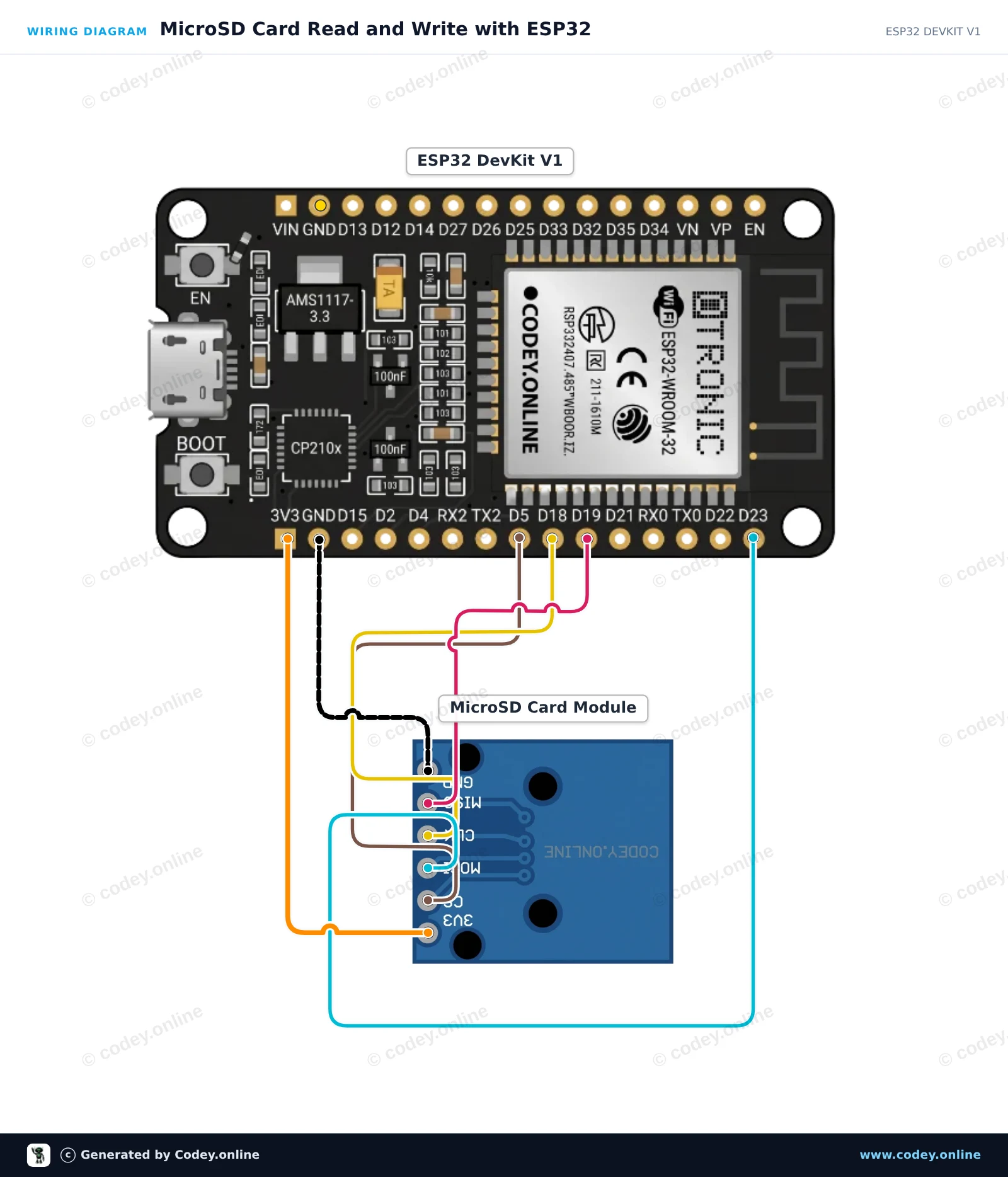
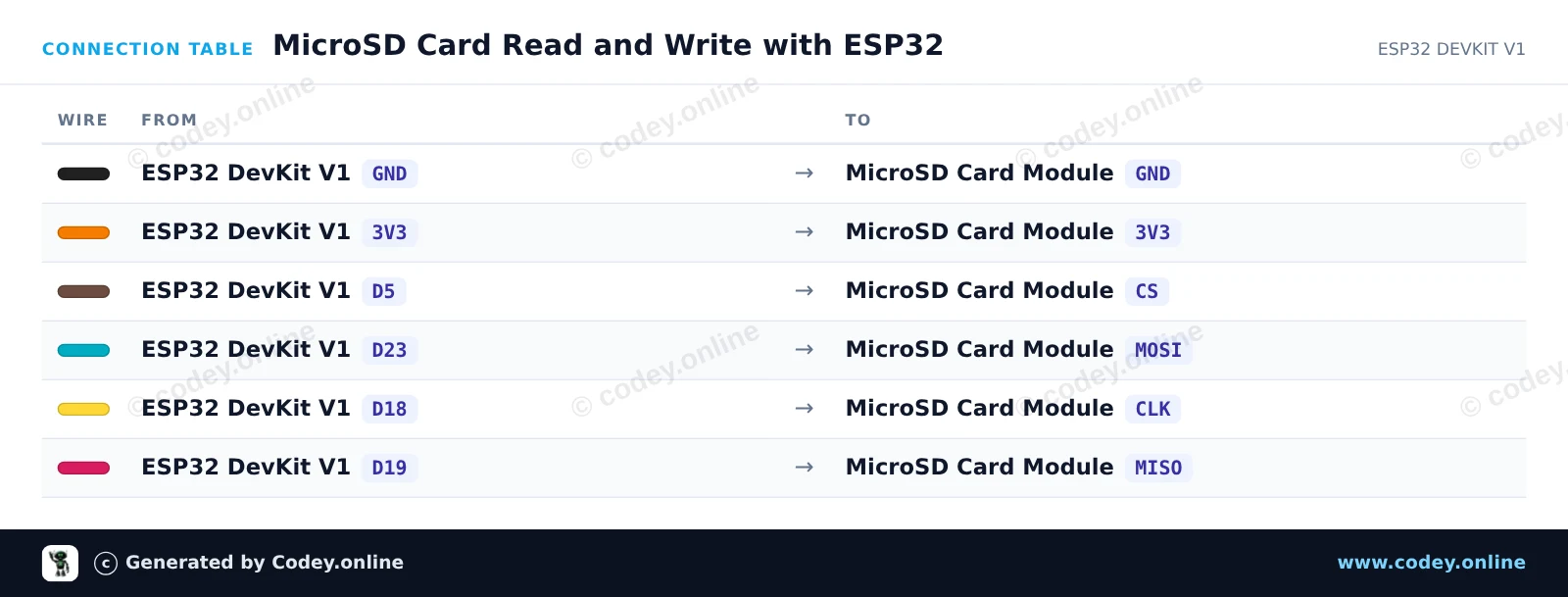
MicroSD Card Read and Write with ESP32

This example demonstrates how to interface a 3.3V MicroSD card module with the ESP32 using the default hardware SPI bus (VSPI). The sketch initializes the SD card, writes a test message to a file, and reads it back to display on the Serial Monitor.

Wiring diagram: 3.3V Micro SD card module for ESP32 | ESP8266 on an ESP32 DevKit V1
Wiring diagram · Click to enlarge
Connection table: 3.3V Micro SD card module for ESP32 | ESP8266 on an ESP32 DevKit V1
Connection table · Click to enlarge
MicroSD_Card_Read_and_Write_with_ESP32.ino · compiled and verified
/*
 * ==================================================================
 *  Generated by Codey.online  —  https://www.codey.online
 * ==================================================================
 *  Project   : MicroSD Card Read and Write with ESP32
 *  Board     : ESP32 DEVKIT V1 (esp32:esp32:esp32doit-devkit-v1)
 *  Parts     : Micro SD Card Adapter Module 3.3V
 *  Libraries : none (built-in)
 *
 *  Codey Online is an AI-powered browser IDE for Arduino and ESP32.
 *  Describe your project and Codey writes the code, draws the wiring
 *  diagram and uploads it to your board, straight from the browser.
 *  This code is free to use, modify and share, without warranty.
 * ==================================================================
 */

#include "FS.h"
#include "SD.h"
#include "SPI.h"

const int chipSelect = 5;

void setup() {
  Serial.begin(115200);
  while (!Serial) { delay(10); }

  Serial.println("\n--- MicroSD Card Demo ---");

  // Initialize SD card on default VSPI pins (CS = GPIO 5)
  if (!SD.begin(chipSelect)) {
    Serial.println("Card Mount Failed! Check wiring and make sure card is FAT32 formatted.");
    return;
  }

  uint8_t cardType = SD.cardType();
  if (cardType == CARD_NONE) {
    Serial.println("No SD card attached.");
    return;
  }

  Serial.print("SD Card Type: ");
  if (cardType == CARD_MMC) {
    Serial.println("MMC");
  } else if (cardType == CARD_SD) {
    Serial.println("SDSC");
  } else if (cardType == CARD_SDHC) {
    Serial.println("SDHC");
  } else {
    Serial.println("UNKNOWN");
  }

  uint64_t cardSize = SD.cardSize() / (1024 * 1024);
  Serial.printf("SD Card Size: %lluMB\n", cardSize);

  // Write to a test file
  Serial.println("Writing to test.txt...");
  File file = SD.open("/test.txt", FILE_WRITE);
  if (file) {
    file.println("Hello from ESP32!");
    file.println("MicroSD read/write test successful.");
    file.close();
    Serial.println("Write complete.");
  } else {
    Serial.println("Failed to open file for writing.");
    return;
  }

  // Read back the test file
  Serial.println("Reading from test.txt:");
  file = SD.open("/test.txt");
  if (file) {
    while (file.available()) {
      Serial.write(file.read());
    }
    file.close();
  } else {
    Serial.println("Failed to open file for reading.");
  }
}

void loop() {
  // Nothing to repeat in this test
  delay(1000);
}

Wiring diagram and example code generated by Codey.online — https://www.codey.online

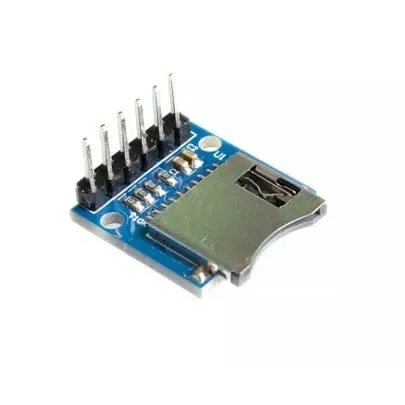
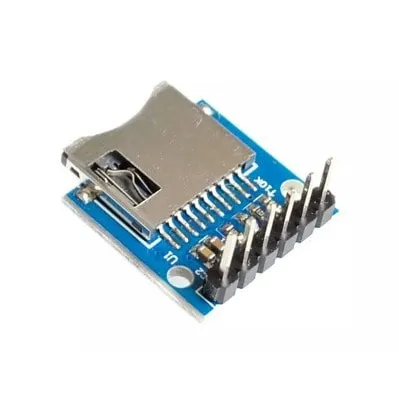
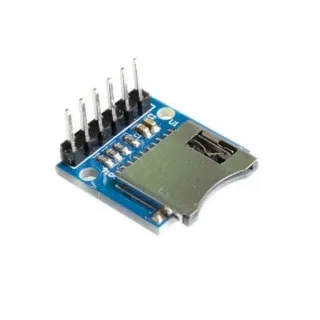
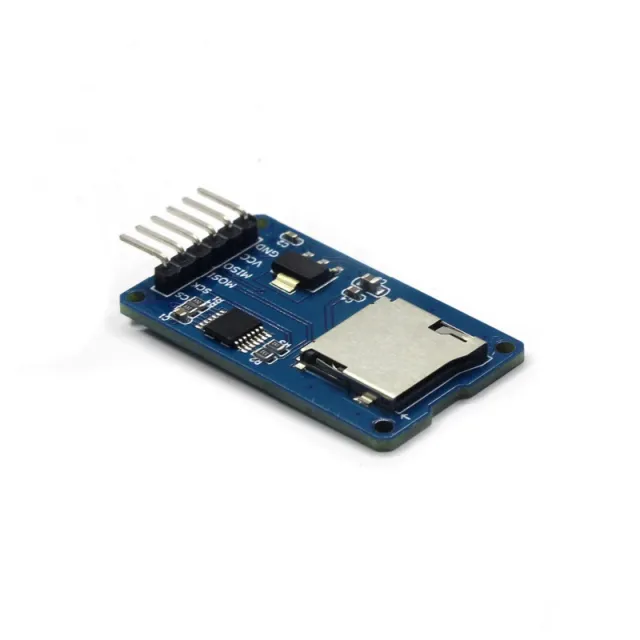
3.3V Micro SD card module for ESP32 | ESP8266

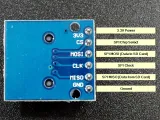
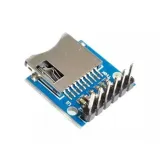
Simple MicroSD card reader module. Because it operates at 3.3V, it is well suited for, for example, ESP32 or ESP8266. The module is equipped with the necessary 10K pull-up resistors on the data lines.

Specifications:
– Operating voltage: 3.3V
- Type of micro SD slot: Push-Pull
– Interface: SPI
– Operating voltage (logic level): 3.3V

Pin headers pre-soldered.

Dimensions
Length: 2cm
Width: 1.8cm
Height: 1.1cm

  • 3.3V operation
  • SPI interface
  • Pre-soldered
  • 2 x 1,8 x 1,1 cm

Why choose this product?

  • Suitable for ESP32 – Works at 3.3V, good for ESP32.
  • Suitable for ESP8266 – Works at 3.3V, good for ESP8266.
  • 10K pull-up resistors – Equipped with pull-up resistors on the data lines.
  • Pre-soldered pin headers – Ready for direct connection.
Specifications
Width1,8cm
Operating voltage3.3V
Length2 cm
Height1,1 cm
Type micro SD slotPush-Pull

Frequently bought together

Total: € 25,48

Reviews

★★★★★ 5,0/5 3 reviews
  • ★★★★★Harke BosgraafVerified purchase

    Does what I bought it for.

  • ★★★★★Arie van der KloosterVerified purchase

    Simple and good.

  • ★★★★★Paul liekensVerified purchase

    Works fine

Write a review
Your rating

Shipping & returns

Shipping

  • Parcel with track & trace€ 7,70Within 24 hours
  • Pick up at PostNL location€ 7,40Within 24 hours
  • Letterbox parcel€ 3,70Within 2 business days
  • Letterbox parcel 24 hours€ 4,55Within 24 hours
  • Pick up in storeFree
All about shipping

Returns

Not satisfied? You have 30 days after delivery to return the product.

All about returns

Recently viewed